



Forum Replies Created
-
AuthorPosts
-
Hello Ori,
Thanks for your suggestions. We will discuss this with our team.
Hello Henri Lebigot,
Please avoid sending a same query in different mediums. You may get duplicate response.
AxCrypt will allow the users to decrypt the encrypted file with the original password which is used for encryption.
If you think you almost know the password, we have simple software allowing you to try to find your password, and you can download the most recent version from https://account.axcrypt.net/Download/AxBruteForce.exe and read of how to use it at https://www.axcrypt.net/axcrypt-brute-force/ . Please note that we cannot provide support beyond this.
Unfortunately, if you do not know the password for an AxCrypt-encrypted file you cannot open it, even if you can sign in to the account. This is by design, it’s just this situation that AxCrypt is made for and it works like this even if you actually are the original owner of the file.
So please try to remember the file password(which was used in the encryption process) to decrypt/open the old encrypted files.
If you do not remember the password to your account, you can always reset it. This is not a way to recover encrypted files! It’s only to allow you to sign in to the AxCrypt app and web. The new password will be used to encrypt new files. Go to https://account.axcrypt.net/Home/PasswordReset to do this, or you can also go there from AxCrypt with File | Options | Password Reset.
For more info about Password Reset: https://www.youtube.com/watch?v=O6whtjSb3pc and https://www.axcrypt.net/blog/password-reset-axcrypt/
Hello Mark Shaffer,
Please check: This might be because of some other third-party applications are not allowing the AxCrypt app to run. Please try to check any firewall or antivirus software’s are blocking the AxCrypt app or not? If blocked, please add the AxCrypt app in the app’s whitelist.
Please delete the folder %LocalAppData%\AxCrypt(C:\Users\’User Name’\AppData\Local\AxCrypt) to clear the local cache and starts the AxCrypt app like a new.
Then uninstall the AxCrypt app and restart the system then install the latest version of the AxCrypt app You can download the same from our official website: https://www.axcrypt.net/download/ . (if already download, please ignore it).
Now install the AxCrypt app and try to start AxCrypting……
If the above doesn’t help, please provide detailed information about the issue and screenshot.also write a email to support@axcrypt.net.
Hello Mark Shaffer,
Do you have any screenshots? If yes, Please you can send a screenshot showing where the problem is, it often helps us understand.
Are you getting any exceptions or error messages while using the AxCrypt app? If yes, what type of exception or error message you are getting? Please share the details of that exception or error message. We are investigating the problem and solve the problem as soon as possible.
please provide detailed information about the issue and screenshot also, write an email to support@axcrypt.net.
Hello Paulette,
It does not sound like it’s an actual AxCrypt problem, but we’ll try to help you out. Please contact our support, by emailing support@axcrypt.net
Include screenshots of the error messages and the AxCrypt window (if it’s there).
Hello Chris,
Our support team is already responded to your same question in support.
Please note: Please avoid the same query in a different medium.
If you are facing any issues, please contact our support team at support@axcrypt.net.
November 5, 2020 at 07:53 in reply to: No puedo instalar la nueva versión de AxCrypt-2.1.1606.0, tengo la anterior. #18460Hello Catalina,
Sorry to say, Please explain in your question more detailed information and screenshot and write an email to support@axcrypt.net.
Hello Miguel,
I wanted to uninstall the prgram from my computer, but can’t find it. — I think you had to install portable version in your system.(not sure)
Download the latest version of the AxCrypt app(installer version—AxCrypt-2-setup.exe file from our official website (https://forum.axcrypt.net/download/ ).
Currently, the AxCrypt right-click context menu is available only in the windows (Installer) version of the AxCrypt app. You can see the same by installing the latest version of the AxCrypt app in your windows system.
We can find the major differences between the standalone version and installer version of AxCrypt, by clicking the following link: https://forum.axcrypt.net/support/faq/#download-version .
If the above doesn’t help, please provide detailed information about the issue and screenshot.also write a email to support@axcrypt.net.
November 4, 2020 at 07:30 in reply to: Encrypting large folder structure – How to knwo when done? #18452Hello David,
AxCrypt app you can see the progress bar and notification.
You can be encrypting one or more files(100 or 1000 file(s)) to encrypt the AxCrypt app, You are seeing the AxCrypt app progress notification.(screenshot attached)
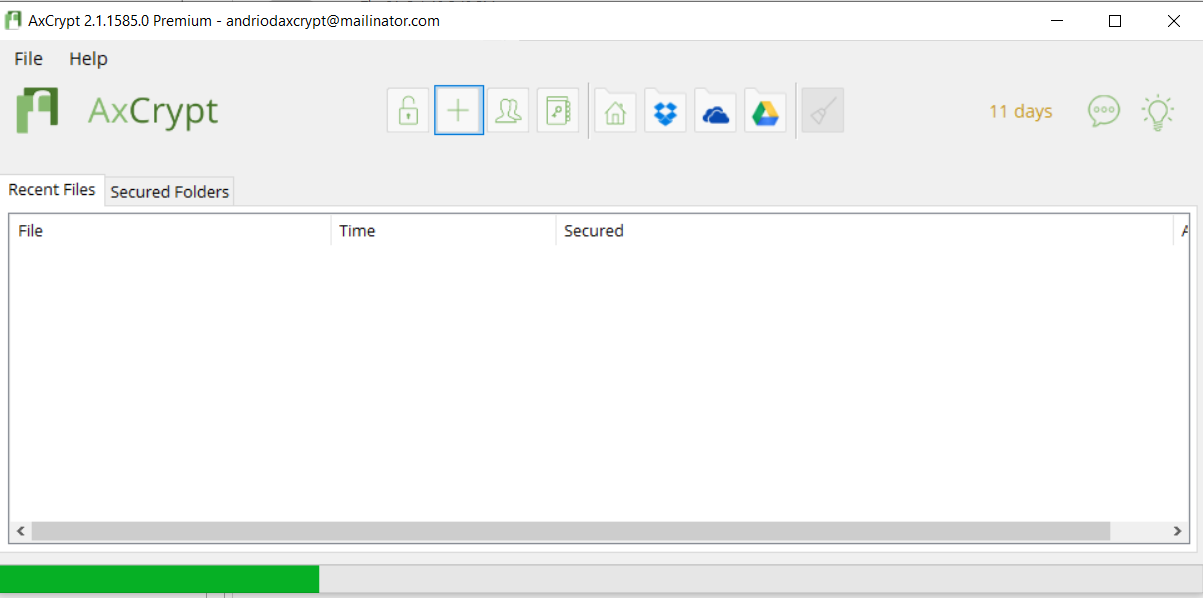
when the task completed the encryption process AxCrypt app will send notification.(screenshot attached)
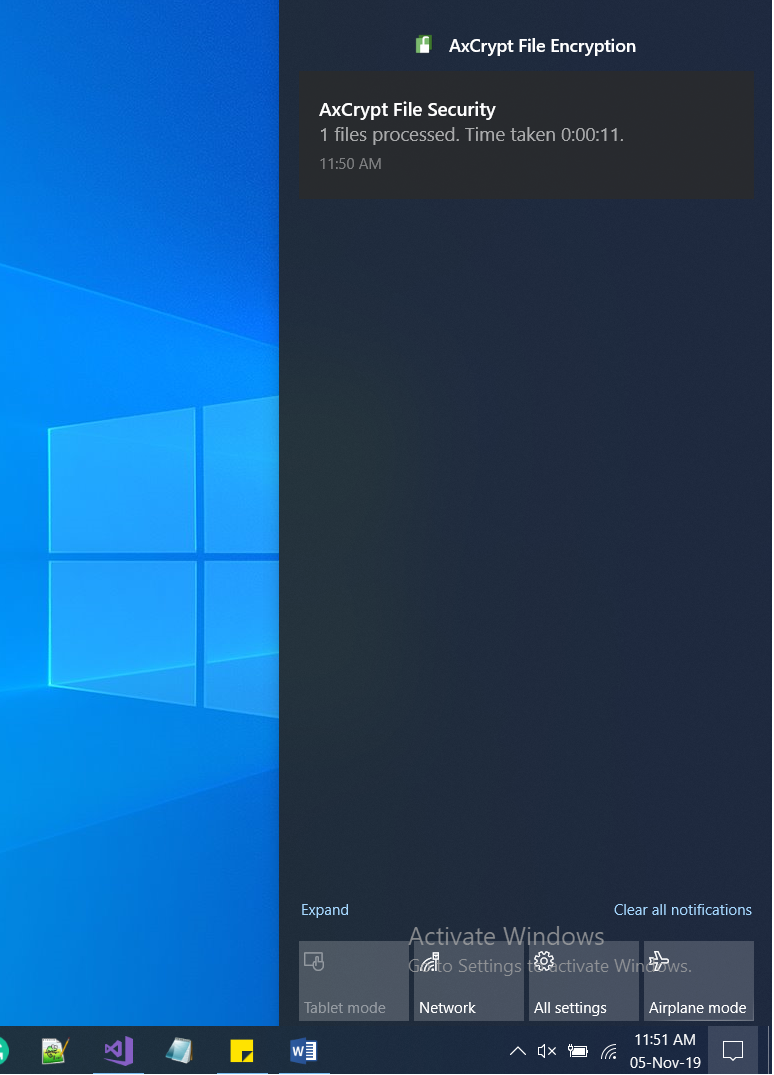
you get the process completed notification.
If the above doesn’t help, please provide detailed information about the issue and screenshot.also write a email to support@axcrypt.net.
Hello Nina
We cannot provide support beyond this.(Bruteforce)
How to use it at https://forum.axcrypt.net/axcrypt-brute-force/.
November 4, 2020 at 06:22 in reply to: Encrypted files will not open on Open command or double-clicking the file #18450Hello Jonathan,
Sorry to say, Please explain in your question more detailed information and screenshot and write an email to support@axcrypt.net.
Hello Jonathan,
Sorry to say, Please explain in your question more detailed information and screenshot and write an email to support@axcrypt.net.
Hello Mad,
Sorry to say, Please explain in your question more detailed information and screenshot and write an email to support@axcrypt.net.
Hello Red,
Sign in to the AxCrypt app with your AxCrypt credentials. Then follow the below instructions to decrypt the encrypted file(s)
You can able to decrypt the AxCrypt secured folder by navigating to the Secured Folders Tab from the AxCrypt app. Then Right click on the selected folder (which you want to decrypt) and choose the menu option Decrypt Permanently.
Or You can decrypt the multiple/more of the encrypted file, first select all encrypted files and then right-click on the file and select AxCrypt > Decrypt
Or In the recent files tab, select all encrypted file then right click on the file(which you want to decrypt) and select Stop Securing and remove from list
Or You can able to decrypt the AxCrypt encrypted file by navigating File | Stop Securing from the AxCrypt app.
Incase the folder is not listed in the Secured Folder list, then you have to secure the folder again using the Add Secured Folder option from the right click content menu.
If the above doesn’t help, please provide detailed information about the issue and screenshot.also write a email to support@axcrypt.net.
Hello Jonathan,
AxCrypt is a file encryption software with no backdoor. AxCrypt do not store users’ information or password in our server, instead it will keep the users’ basic information like Email address, IP Address and more. To know more about what stored on our server, please check our privacy policy- https://forum.axcrypt.net/information/privacy-policy/.
If the above doesn’t help, please provide detailed information about the issue and screenshot.also write a email to support@axcrypt.net.
-
AuthorPosts