



Forum Replies Created
-
AuthorPosts
-
Hello Andrew,
Well, it depends on when you set the password – but the rules are no help in guessing your password. At the very least, it has to be 10 characters. When you set it from the app a certain computed complexity must also be achieved.
You yourself is the only source of information for reducing the search space, i.e. do you have some kind of format that your passwords usually follow (a bad idea, but it might help you out here).
Hello Anonymous,
Thanks for reporting this. We have been aware of this problem for a short while. We’ll try to fix at asap. Sorry for the inconvenience!
Hello Raphael,
No, to share encrypted files with others, you do not share passwords anymore.
Instead, you use the key sharing feature, which allows you to share encrypted files with others, and they will be able to open the files with their own password.
See the section on Key Sharing here: https://forum.axcrypt.net/documentation/how-to-use/ .
Hello Jimb and Robin,
Point of clarification – AxCrypt 1 is a pure symmetrical crypto system. AxCrypt 2 is extended with some asymmetrical functionality.
We store the private asymmetrical key on our servers, and on your local PC. It’s encrypted with your current passhrase. If your current passphrase is compromised *and* the attacker has access to the private encrypted key, then *changing* the passphrase on our servers won’t stop that attacker. You’ll have to re-encrypt the files with a new public key. This, however, is no worse than before, in fact it’s the same. If your passphrase was compromised, you’d have to re-encrypt files with a new passphrase before the attacker could get at the files.
Hi Jimb,
c) is the closest to the actual situation, but there’s more to it.
First, when you sign up for AxCrypt, you get what we call your AxCrypt ID. Technically, this is a RSA-4096 key pair. A key pair consist of two encryption keys – a public key and a private key. The public key is non-secret, and can only be used to encrypt data. The private key is secret, and can only be used to decrypt data.
On our server, we store your AxCrypt ID – the public key in plain text and is available for anyone with an account to get, and the private key encrypted with your password as an AxCrypt-file.
To encrypt a file, the following (simplified) happens:
1 – A random 128 or 256-bit key is generated. We call this the master file encryption key, or session key.
2 – The file is encrypted using AES-128 or AES-256 with the master key.
3 – The master key is encrypted with your password and added to the encrypted file.
4 – The master key is encrypted with the public key of your AxCrypt ID.
5 – Optionally, the master key is encrypted with the public key of any other recipients that are configured using the key sharing feature.
So, to decrypt a file, you need access to either the original password used *or* the private key corresponding to any public key used to encrypt the master key – i.e. the private key part of your AxCrypt ID.
When you change the password of your AxCrypt sign in, what really happens is that the private key is decrypted with the old password, and then re-encrypted with the new password.
Therefore, as long as you have access to your AxCrypt ID, you can open any file encrypted with it, using the new password. So, yes, there is a way for us to change how you open files on computer A, even if you changed the password on computer B (as long as computer A is allowed to sign in to our server at least once).
As a safety measure, we also as mentioned always also encrypt the master key with the password itself, this protects you from the scenario that you for whatever reason lose access to your AxCrypt ID.
All of the above is a simplified version, the details are more complex, but it’s all done using well-known standard cryptographic techniques and methods. For full details, please check out https://forum.axcrypt.net/documentation/technical/ .
Hello Ralph,
Thanks for the heads up. It does indeed to appear to be a false positive. Googling for ‘TrojanDropper.Daws.gpp’ finds other instances where ‘Jiangmin’ is the only only engine to report that threat for other files.
Fortunately virustotal also shows a SHA256 hash of the submitted sample, so I can confirm that your download was not tampered with – it’s the original from us. We publish current checksums here: https://forum.axcrypt.net/cryptographic-hashes-files/ .
I cannot stress how important it is that anyone who finds something suspicious, such as virus engine alerts or incorrect or suspicious digital signatures include:
– A sample of the file in question.
– A correct and full URL of where it was downloaded. (‘The AxCrypt site’ is not precise enough, the full URL as shown in the browser address bar, please!). I.e.: https://forum.axcrypt.net/download/ which is the official download page, or even https://account.axcrypt.net/download/axcrypt-2-setup.exe which is the actual download itself.Hello Jimb,
Thanks for the feedback!
Let me just comment:
#1 – what password is used where. This is a usability issue we’re having only with users of the previous version, and especially those who use several different passwords for whatever reason.
The idea is to make it even simpler – that it’s only one password. For all files. And if you change it, the new password works – even for files encrypted before the change.
The problem you’re having happens when the paradigm of the old and new gets mixed up.
#2 – Speed – it shouldn’t be like you describe. There may be a 1-2 second time after entering the password the first time, thereafter speed should really be comparable. We’ll have to look into that, if you can provide more information.
#3 – Stay signed in – that’s a bit related to #1, it’s mostly existing users why collide with this feature. We made it so, because of various problems with version 1, and to encourage the use of long and strong passwords – which is hard if you have to type them all the time. Nevertheless, we’re backing down on this one and will be adding options to control how this works.
#4 – Different passwords, vs Key Sharing. We really think Key Sharing is the way to go. You do not need to share any passwords, and if you share with someone who does not have AxCrypt we’ll invite him/her automatically as part of the process. Still, we’re considering to add Password-based Key Sharing as a complement.
We’re working on ways to make the transition for existing users more clear.
Thanks again for the feedback!
Hello Robert,
Have you rebooted? Have you downloaded the installer version, and not just the portable standalone version?
The AxCrypt menu should be there, just like before.
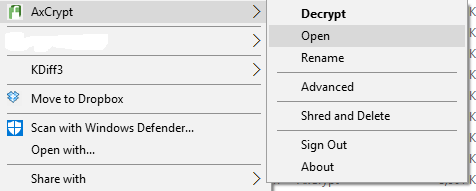
Hello Jym396,
You should be fine with 4.5, no need for 4.6. Does this link work: https://www.microsoft.com/en-us/download/details.aspx?id=30653 ?
Hello Pascal,
We don’t really explicitly support it in the sense that we won’t be around to help you out, but the bootstrapper .exe supports quiet installs and the contained .MSI files support silent and automatic installation via Group Policy using Windows Installer.
Run the installer with /help to learn more. I.e.:
AxCrypt-2.1.NNNN.0-Setup.exe /help
Roque,
Thank you for your input. It’s on the to-do list.
January 26, 2017 at 12:35 in reply to: Can't open existing Axcrypt files with latest version of Axcrypt #5307Hello gm,
Not sure, but from what it sounds like you’re trying to sign in to AxCrypt using an email adress and your old file password.
Perhaps you can describe in more detail what you’re doing? Please be aware that AxCrypt 2 works a little differently than AxCrypt 1 – but it does allow you to open all AxCrypt 1 files as long as you know the password that was originally used to encrypt them.
January 25, 2017 at 21:51 in reply to: Can't open existing Axcrypt files with latest version of Axcrypt #5294Hi gm,
Could you perhaps provide a screen shot of the situation? It’s not clear just exactly what your situation is.
Hi Neville,
It sounds like a local system DNS attack. The easiest way to do such a thing is via the hosts file. In any case, in addition to getting a sample file (which I still have not received from anyone posting here), if I could get an IP-address for what ‘axantum.com’ seems to point to for one of you who see the strange ‘axantum.com’ site it would be appreciated.
A simple ‘ping’ in a command window usually suffices to find out the IP.
Since it’s really important to find out what, if anything, is going on – I urge anyone who posts here about this issue to please try to provide enough information so we can see what you’re seeing. This includes:
– URL’s you’re visiting.
– IP addresses to http://www.axcrypt.net, account.axcrypt.net, axantum.com and http://www.axantum.com .
– Actual downloaded files that do not match the information provided earlier in this thread for the genuine thing.
– Any SSL certificates that are presented by sites that do not match the genuine sites. They can be inspected, and downloaded via most if not all browsers.Send files and such to support@axcrypt.net please.
Hello Marco,
Please! Send a link to where you downloaded the file, and also send the actual file to support@axcrypt.net . We cannot investigate this unless we can see what you see.
Also, it’s not easy to know exactly what you’ve downloaded since we don’t know where or what, but the correct hashes of ‘AxCrypt-2.1.1489.0-Setup.exe’ is:
MD5: ca117875db4cd0c011132c782957f248
SHA1: 9f8a0688008c0969d1edb639af81e3205458d692
SHA256: 8c6856038c15ff231e66521fc4cef210226083b6b134de64e36b31f149b22b48The correct hashes for ‘AxCrypt-1.7.3180.0-Setup.exe’ is indeed as you report Marco (but we’re really more interested in getting a sample of a ‘bad’ file than a ‘good’ file):
MD5: 3156d97c3fcce2e2edaa3468755be806
SHA1: a9fac97c1ed306690abfb90b03331482c82c91ae
SHA256: 6a075e415a3c98e835997d0896aab2da5ba0565bd2bf4a6a7a05afdd8c25870aSo, folks, can anyone with a file not matching the above – especially a AxCrypt-2.1.1489-Setup.exe with a digital signature timestamp that is in January 2017, please provide us with a sample and/or a URL where the file was downloaded from?
-
AuthorPosts