Secure file encryption since 2001
Help & support

Old Axcrypt file not opening

21 replies 10 participants Started Active

Actions

Reply
Adam Guest
Report spam

I used to use the old Axcrypt on my Windows PC.

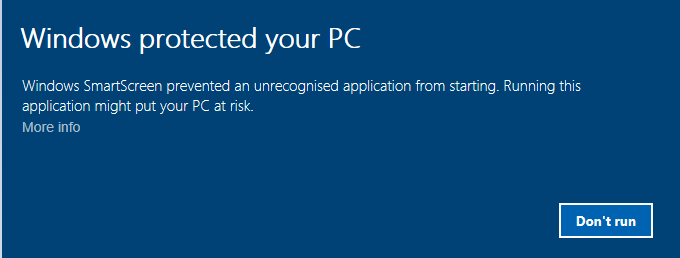
I've installed the new Axcrypt but when I went to open one of my encrypted files it gave me this warning message. I've pressed More info and there's no option to run it.

Is there any way I can open my old encrypted Axcrypt file or do I need to install the old Axcrypt again?

I don't know if it's a Windows problem or an Axcrypt problem.

Thankyou

Windows SmartScreen

21 replies
AxCrypt Support AxCrypt Team
· 1,810 posts
Report spam

Hello Adam,

That's strange. Windows sometimes displays that message, when we released a new version but we quickly get the reputation needed to avoid. Unfortunately Microsoft has chosen to respect the fact that we're digitally signed with a proper certificate.

You should be able to run it anyway, under More Info. See here: http://www.howtogeek.com/123938/htg-explains-how-the-smartscreen-filter-works-in-windows-8/ . Do you have a screen shot of the "More Info" screen?

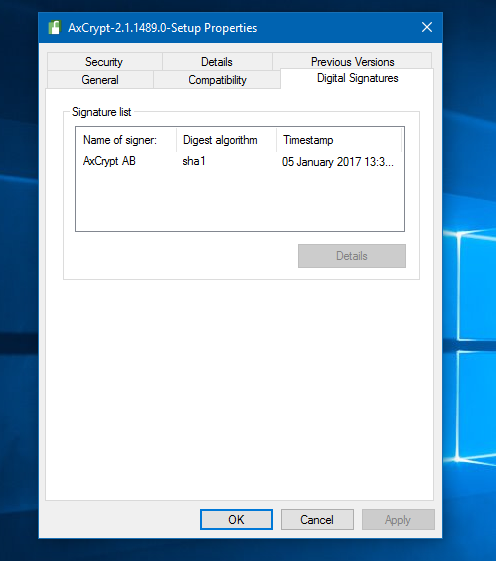
Also, ensure that you downloaded the most recent version of AxCrypt from http://forum.axcrypt.net/ and that the digital signature is correct by checking file properties after download, and select "Digital Signatures".

Anonymous Guest
Report spam

Hi, it's the self decryptor Axcrypt file that I'm trying to open, not the actual Axcrypt file. The More info shows nothing, it's blank.

You said that

 Unfortunately Microsoft has chosen to respect the fact that we’re digitally signed with a proper certificate.

Did you mean that Microsoft has chosen NOT to respect? I don't think this applies here anyway because you don't sign the self decryptor files?

I don't trust Authenticode because it's too easily tampered with. There is a version of Axcrypt on the internet which I haven't installed because my antivirus says it's not real. It has your certificate but a different date of signing when I compared it to the version of this website.


Adam Guest Topic starter
Report spam

Do you know why this file is signed by Axcrypt certificate if it isn't genuine?

I managed to decrypt my self decrypting files on an old Windows 7 computer.

AxCrypt Support AxCrypt Team
· 1,810 posts
Report spam

Hello,

First, yes - my bad. Microsoft has chosen NOT to respect the signature.

Secondly - I'm confused. Adam - what was the name of the executable that triggered the first "Windows protected your PC" message. You wrote that it popped up when you tried to open an old file, so I was under the assumption that this happened when you tried to use the new version 2.1 AxCrypt. If, in fact, this was a self-decrypting file i.e. something like "My File-ext.exe" - then it's entirely possible that the warning comes up. But I still don't see why you don't get an option to run anyway.

Now, you write "I don’t trust Authenticode because it’s too easily tampered with". Really? This is not true at all. Authenticode is a strong digital signature, with quite adequate cryptographic strength. Can you provide a reference to indicate that Authenticode is vulnerable?

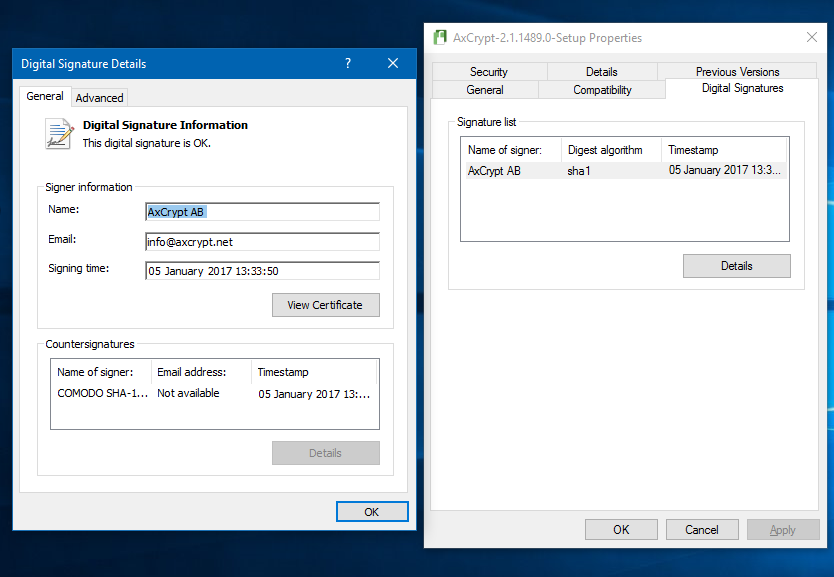
Finally, you refer to "a version on the internet" and send a screen shot with what appears to be a digitally signed "AxCrypt-2.1.1489-Setup.exe" but with a timestamp of January 5, 2017 - and that is indeed wrong.

Can you check the validity of this signature using the 'Details' button please and send a screen shot. Also, I'd very much like a copy of that file as well a link to the source of it.

The correct current setup shows the following under 'Details':
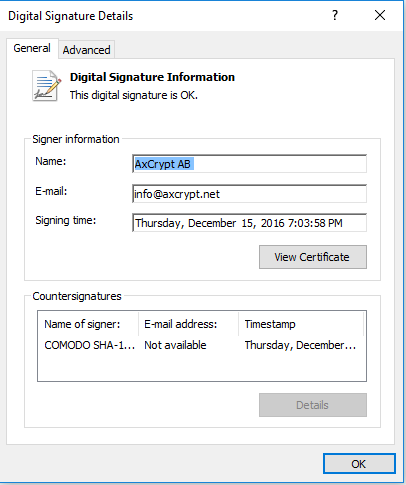
Anonymous Guest
Report spam

I asked Bitdefender for tech support and they said they block untrusted executable files from running if they're not trusted by Windows Smartscreen. They said that Smartscreen intercepts suspicious files first and then the antivirus blocks any attempts to run it. I'm not a very technical user but I think I understand what has happened.

I downloaded my Axcrypt self decrypt backup from Google Drive onto my Windows 7 computer when a friend suggested I do that and it worked on there. I then copied the files onto a USB and onto my Windows 10 computer and it worked :)

I've sent the screenshot that you asked for.

When I was speaking to Bitdefender they asked me to email them a copy of that file for analysis. I asked a technical friend about Windows Authenticode and he said that it's not difficult for people to obtain fake certificates or modify rogue software to bear a real certificate. He said that a lot of software has asc/has signatures and I should check these instead.

I can't remember where I downloaded it from but it was probably Filehippo or CNET because the download on here wasn't working and kept redirecting me. The Axcrypt website download is working now and I have all my files back I'm pleased to say.

Thanks for helping me.

AxCrypt Support AxCrypt Team
· 1,810 posts
Report spam

Hello,

Can you please send the actual setup file with the January 5 timestamp to me at support@axcrypt.net ? You may need to copy it to a new name, and change the .exe-extension (I usually add ".removeme" for example), as email software often blocks .exe files.

Marianne Guest
Report spam

this is worrying.

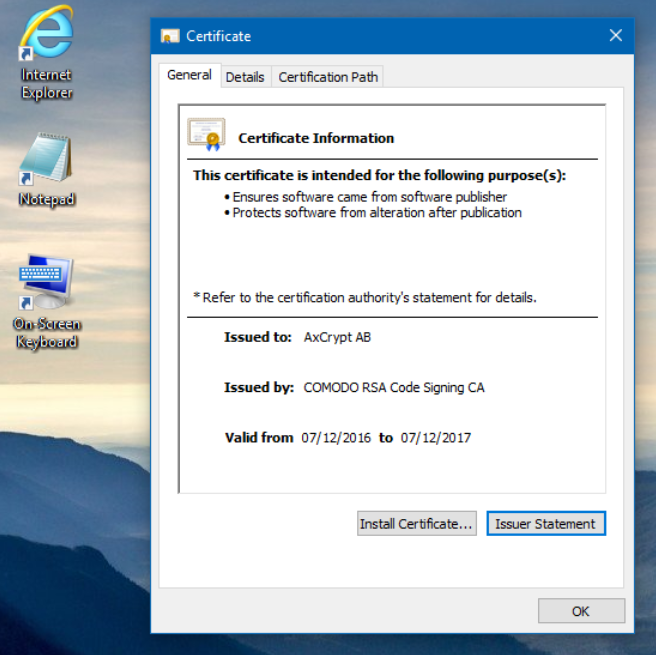
i downloaded axCrypt from TUCOWS and my date is janury 5 as well.

here's the picture from my screen and the certificate.

AxCrypt Support AxCrypt Team
· 1,810 posts
Report spam

Hello Marianne (and anyone else seeing a download signed on January 5),

I can't find AxCrypt 2 on Tucows at all. I only find a completely outdated version 1.5.

Can anyone who has the installer dated January 5, please either send a copy to support@axcrypt.net, or post a download link here so we can examine the file?

Cyril Guest
Report spam

I don't have this problem, I've double checked my installation file, but I agree with Adam that Authenticode does have problems.

Research Papers

https://software.imdea.org/~juanca/papers/malsign_ccs15.pdf

https://www.blackhat.com/docs/us-16/materials/us-16-Nipravsky-Certificate-Bypass-Hiding-And-Executing-Malware-From-A-Digitally-Signed-Executable-wp.pdf

There are other papers out there. Really AxCrypt should be publishing the SHA256 sum of the software in addition to Authenticode considering the importance of maintaining the integrity of encryption software.

Reply to this topic

Posting as a guest. Log in or sign up to get reply notifications and edit your posts.

Tip: describe your AxCrypt version, operating system and the exact error message. Never post your password or license key.