



Forum Replies Created
-
AuthorPosts
-
Hello Eric,
The reason the AxCrypt upgrade had no effect (but it’s good you did anyway since we don’t support version 1 anymore), is that it’s not an AxCrypt problem.
It’s a problem with the application (Excel) or the file association (.xls). Start by decrypting one of the files (just right-click it, and select AxCrypt decrypt) so you get the original .xls file back.
Then double-click it to open it without the involvement of AxCrypt. Hopefully that will give you a clearer indication of what the real problem is.
December 5, 2017 at 16:03 in reply to: Axcrypt seems to keep versions in the user's AppData local folder – can purge? #8377Hello Todd,
First – Please upgrade! That version is ancient. You should be seeing a red icon warning you of this. Go to https://forum.axcrypt.net/ and get the latest version,
You should let AxCrypt clean it up with the red broom icon. You won’t confuse AxCrypt if you delete them manually – but you may lose your most recent edits, since if you have any that have not been re-encrypted, if you delete them the changes are lost.
December 4, 2017 at 19:50 in reply to: Dosya şifremi unuttum nasıl fotolar açılmıyor nasıl düzelecek #8351Hello tekin,
Please read https://forum.axcrypt.net/support/faq/#forgot-password .
Hello Anonymus,
Nope, that doesn’t seem to make sense! It shouldn’t display that if you have Premium of course. Can you send a screenshot of this?
Hello jjruiz,
AxCrypt 2 will try to open an encrypted file with the password you use for sign in to the app.
If that fails, it will prompt you for a file password, and if it’s a version 1 file give you the option to provide the path to a key file (key files are not supported in AxCrypt 2, except for backwards compatibility with AxCrypt 1).
If an AxCrypt 1 file is successfully opened, it will (by default) be re-encrypted with the AxCrypt 2 password and upgraded to AxCrypt 2 format including AES-256 if you have Premium.
You can also bulk-upgrade AxCrypt 1 files from the menus.
Hello Frank,
I’m glad it’s all cleared up now! Good luck.
Hello Kim,
AxCrypt encrypts files using the password provided when encrypting. You need to provide that password. The files you are trying to open, are encrypted with a different password than the one you’re using to sign in with to AxCrypt.
When you try to open one of the files you mentioned, AxCrypt first tries the password you are signed in with. That apparently is not the correct one. So AxCrypt asks you for the file password.
You then type the same password you are already signed in with, which won’t help, since that is already tried. So, AxCrypt tells you this.
You need to remember the original password used to encrypt the files in question.
Hello Frank!
Yes, AxCrypt on Mac has pretty much the same feature-set as on Windows – but you do need to purchase Premium on the Mac. The Free plan on the Mac only covers viewing and decrypting of encrypted files, not encrypting new files or updating existing encrypted files. Sorry…
Hello,
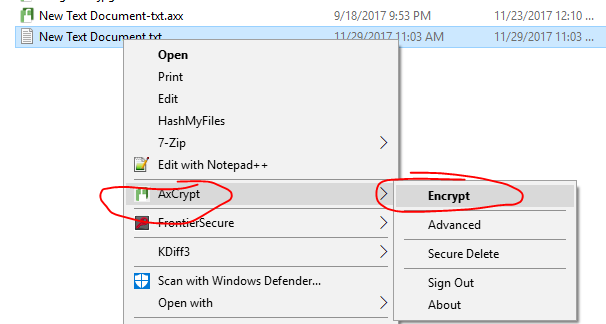
The new version does this in exactly the same way on Windows. There’s a right-click menu ‘AxCrypt’, with an option ‘Encrypt’.
 November 29, 2017 at 11:02 in reply to: Windows does not reflect date of changes made to files encrypted w/ AxCrypt #8315
Hello Jay,
It has no own logging to the Windows event logs. If the .NET framework crashes for example, it will log. In either case, AxCrypt will not log any normal activity.
AxCrypt does do it’s own logging to a text file, and it can be found in %localappdata%\AxCrypt . It will not log normal activity, only error situations and such.
In %localappdata% there is also a file describing the list of files in the recent files view, and the secured folders view. The original file names are encrypted, but not the folder names and encrypted files – after all, they are visible in Windows Explorer anyway so it makes little sense to “hide” them as they are in plain sight anyway.
Hello Greg,
Unfortunately they are a little behind their times as far as certificate management and handling is concerned. They do not support Let’s Encrypt, we’ve already asked about this. Also, their infrastructure is in general need of updating, they still use and allow some obsolete cipher suites etc. We have an ongoing discussion with them about this, and they are supposed to be working on updating this. To be honest, we’re not 100% happy with the services for our purposes but we’ve not been able to prioritize a move – but this incident certainly does indicate we should ;-)
Hello Greg,
Thank you for notifying us. Apparently our hosting provider has not done their job. Although I did not do this personally, as far as I know we have ordered a new certificate several weeks ago, and it should have ready and installed with margin.
Just to be clear, this only affects ‘www.axcrypt.net’, which is an information-only web server entirely (both logically and physically) separate from our infrastructure web server, ‘account.axcrypt.net’ .
We will address this immediately.
Once again, thank you!
Hello Mark,
Unfortunately there is much that is unclear in your description of the problem, I’m fairly sure you’ve left some things out – like the fact that you apparently reset your password yesterday, twice. From what we can see, you’ve been using AxCrypt for a little over a year, perhaps you used AxCrypt 1 before then. AxCrypt 2 did not exist 4 years ago.
From our logs it looks like you’ve been successfully using AxCrypt for a long time – but yesterday you started using the wrong password, and was denied access and as a result you issued a password reset.
This will allow you to sign in, but not to decrypt files encrypted with the original password.
You should also proababy upgrade your version of AxCrypt, it appears you’re using an outdated one (it won’t solve your problem, but it’s still a good idea).
Try to remember what password you normally use. The brain is funny this way, sometimes it just forgets. True story: literally yesterday, I had to log on to my Mac which I’ve had for almost a year – and suddenly I could not for the life of me remember the last part of the password! I had to go to the password manager and look it up. This a password I’ve been using almost daily. We have several cases of users also suddenly mixing up passwords – i.e. using the right password in the wrong place. It’s happened to me personally as well, but I’ve caught on after a couple of failed attempts.
If the above does not help, please take a screen shot of the situation. How to take a screenshot on your PC is explained here: https://support.microsoft.com/en-us/help/13776/windows-use-snipping-tool-to-capture-screenshots .
Hello Frank,
AxCrypt for Mac requires the Premium version for encryption and editing, yes. The free version for Mac is a viewer, it only supports viewing and decrypting.
I do not quite understand what you’re saying with “I can save simple text files without an issue if I unlock them first.“
November 24, 2017 at 13:40 in reply to: Not accepting password, even resetted from website, still no #8291Hello Jeff!
Happy to hear it. Sorry for the misunderstanding on my part ;-) Screen shots are really great…
Right-click and encrypt is indeed available on Windows for the free version as well… It does require you do use the installer, not the stand-alone version though. That’s actually pretty much the difference between the stand alone and the installer, and what the installer does.
-
AuthorPosts