Secure file encryption since 2001
Community

Offline decryption

24 replies 3 participants Started Active

Actions

Reply
Lucas Guest
Report spam

Maybe a checkbox would be a better option but it'd need careful explaining.

The whole point of AxCrypt v2 is to encourage online use (i.e. username and password sent to a central service). Absent AxCrypt closing down there should be no reason to not enter a real email address when prompted.

Main thing is that the service is redundant: that is, you can access your files whether AxCrypt servers are online or offline.

Paul Reed Guest Topic starter
Report spam
Main thing is that the service is redundant: that is, you can access your files whether AxCrypt servers are online or offline.

Totally agree, that was my concern, but I'm pretty confident now about recovering data via AxCript should the worst happen.

Paul

AxCrypt Support AxCrypt Team
· 1,810 posts
Report spam

Hi Paul,

Trust, but verify, right?

AxCrypt (the client) will fallback to offline mode even during first time registration if our servers are unavailable, for whatever reason (no Internet, we're out of business, we're under attack etc).

So, if this happens, we'll generate an AxCrypt ID (the key pair) offline, and at the first opportunity (if ever) we'll synchronize with the server and update the key pair at both ends. If our servers are never reached, it all works without them. You just need to know the password used to encrypt older files. If it's different from the one you set during the offline registration, you'll be prompted for the file password.

Here are a few screen shots from AxCrypt being installed from scratch on a computer where the DNS name resolution was modified so that 'account.axcrypt.net' (our server) went to empty space - i.e. the same effect as if our servers are down and non-responsive. The same thing happens if DNS cannot resolve the name at all, or if the connection is blocked by a firewall, or if your computer just does not have Internet connectivity.

After entering an email in the dialog you show (that just has to 'look' like an email), you come directly here, no prompt for verification code:
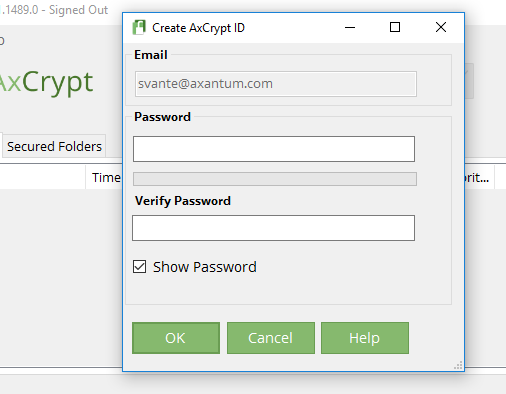
After entering the email, you come directly here.

Then, after setting a password, we'll generate a 4096-bit RSA key pair locally. This takes time.:
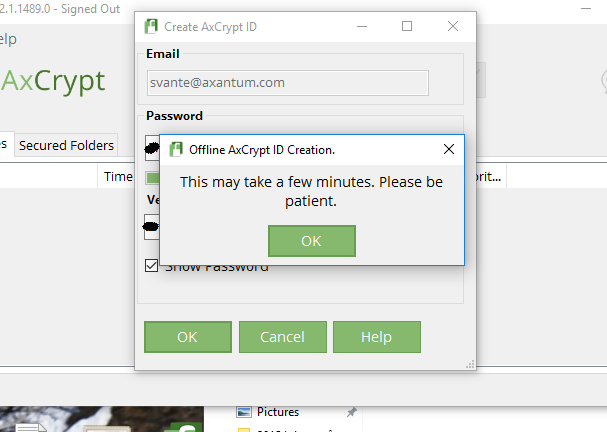
Finally, after signing in, it's as usual - but you're offline. Check the title bar.
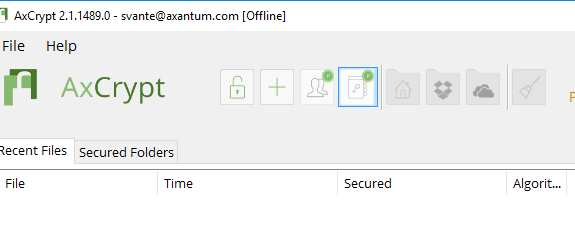
Now all works as normal, except you're offline and your key pair is locally generated. But you can still open any file as long as you know the password originally used. As mentioned - the key pair is used for convenience and for the key sharing feature, when you share encrypted files with other recipients.

As mentioned, as long as you have the software and know the password, you do not need our servers to even exist on the Internet, much less any Internet connection at all in order to continue to use AxCrypt.

Paul Reed Guest Topic starter
Report spam

Thanks Svante, I did the same exercise last night, and reached the same conclusion, all worked exactly as you have described, and I successfully recovered all of my test data.

You've convinced a sceptic!!

Paul

AxCrypt Support AxCrypt Team
· 1,810 posts
Report spam

Great to hear Paul,

A final comment on a question posed by you and others about why we ask for an email adress even in offline mode.

There are several reasons for this:

1) Our assumption is that the state of offline is mostly temporary. Once we're online again, we'll use the email to attempt to synchronize with the server.

2) We will support several AxCrypt users under one Windows Login (or under one iOS / Android user etc) in the future. In this case we need some kind of 'user name' to separate them, and it just seems reasonable to use the same type of identifier we use for normal online operation. It's also easy for people to remember and recognize, and requires no 'invention' by you. If we asked you to "chose a user name", many would be confused by that instead. And, we still have 1) above.

Reply to this topic

Posting as a guest. Log in or sign up to get reply notifications and edit your posts.

Tip: describe your AxCrypt version, operating system and the exact error message. Never post your password or license key.