

Forums › Help & support › Axcrypt stopped working
This topic contains 15 replies, has 3 voices, and was last updated by  Prabhukumar R 7 hours, 22 minutes ago.
-
AuthorPosts
-
PauloAfter the update on Microsoft this October 2017, my axcrypt stopped working. I cannot open any encrypted file or decrypt them. What shall I do?
JamesFirst of all ensure you’re running the latest version of AxCrypt.
If you’re still having problems please post a screenshot of the error message along with your exact Windows version (type WINVER into the run box) and AxCrypt version.
Hello Paulo,
If you’re still having problems, please do as James suggest. We are not aware of any particular problems with any recent Microsoft update.
JanSame here. AxCrypt just stop working after Win 10 update. I have installed the latest version. Even the portable version not working!! This has totally destroyed my trust to AxCrypt and cost me quite a bit of cryptocurrency!
In future I will only use VeraCrypt which has never failed me!
Hello Jan,
No, AxCrypt app working fine in windows 10. so many users are working AxCrypt app without any issue.
Please explain what is the problem you are facing the AxCrypt application.
Are you getting any exceptions or error message while using AxCrypt app? If yes, what type of exception or error message you are getting? Please share the details of that exception or error message. We are investigating the problem and solve the problem as soon as possible
You can send a screenshot showing where the problem is, it often helps us understand. Also you can send the complete error report to troubleshoot the issue.
Please follow the detailed instructions to take the complete error report: https://forum.axcrypt.net/blog/send-complete-error-report/.
Still, you are facing any issues, please provide more information about the issue and write a mail to support@axcrypt.net.
Jan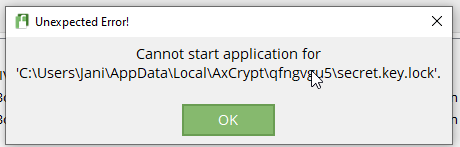
I tried to use the stand-alone version and got this error message
Hello Jan,
Please avoid sending a same query in different mediums. You may get duplicate response
It might be happened because of some firewall/antivirus or other third party applications are blocking the AxCrypt app. So please check the firewall or other software settings.
If you have updated the encrypted files contents and which is pending for re-encryption, then please check the folder(C:\Users\”User Name”\AppData\Local\AxCrypt). If you found any subfolders inside the AxCrypt folder, take a back up of those folders. Then clean the local cache by the below described way.
Please delete the folder(%LocalAppData%\AxCrypt(C:\Users\’User Name’\AppData\Local\AxCrypt) to clear the local cache and starts the AxCrypt app like a new.
Then uninstall the AxCrypt app and install the latest version of the AxCrypt app. You can download the same from our official website: https://forum.axcrypt.net/download/.(please ignore if already download)
Now install the AxCrypt app and try to start AxCrypting……
JanI think firewall/antivirus is not an issue since I was able to decrypt some other AxCrypt files.
I think .axx file is simply somehow corrupted.
Hello Jan,
If the file is actually damaged to this extent, no, it can’t be fixed. The data is just not there to decrypt it.
Please check the files whether those are corrupted or not using the below instructions.
But we have a feature called Check File. You can able to decrypt the corrupted AxCrypt encrypted files by navigating the menu File | Options | enable Debug from the AxCrypt app.
Also we can generate a summary of file structure, to see whether the file was encrypted with AxCrypt or not.
For the summary, you have to use the debug menu and then select the Check File menu option(Debug | Check File). Now you will be prompted to choose the files. Choose the AxCrypt encrypted file. Then AxCrypt will generate a summary of file structure.
Still, you are facing any issues, please provide more information about the issue and write a mail to support@axcrypt.net.
Rafael DavilaThe program no longer works and I have all my medical, bank and taxes files encrypted.
There is a warning that reads AxCrypt failed to start – The path is not of legal form.
Hello Rafael,
We have responded to your support email. Please check your email.
“Please avoid sending a same query in different mediums. You may get the duplicate response”
Helen LeongI had been using my PW in the past to secure files, but now the PW is not valid. I did not change the PW.
UweHallo,
I have an older AxCrypt-Version. Since today (Oct. 20th, 2026) it does not work in Win11 and Win10. Can my old version 2.1.1494.0 expire? It wants to have my e-Mail and does not accept it. What can I do to access my old files?
Regards
Uwe E
DamianI think I have same problem, I am from brazil and I cannot login to my account today. I did not change any password and this message comes after login- Actually the download link to download a new version is rejected as well.
I receive this message:
You are signing in with a local password, instead of the online account password.
This is often the result of a password reset online, but use of the old password now.
Please ensure you are using the same password and account online, or contact support.After that, it takes to your website and does not allow me to loggin with my passwords.
Dear AxCrypt User,
We are currently experiencing a technical service disruption affecting certain AxCrypt online services, including account sign-in and new account registration.
Our engineering team is actively working with our infrastructure provider to restore normal functionality as quickly as possible.
Users who are already signed in may still be able to access certain AxCrypt features in offline mode. However, new sign-ins and some account-related functionality are currently affected.
If you receive an incorrect password message during this disruption, it does not necessarily mean your password is wrong.
We understand how important reliable access to AxCrypt is, and restoring these services is our highest priority.
We sincerely apologize for the inconvenience and will provide further updates as soon as more information becomes available.
Thank you for your patience and understanding.
-
AuthorPosts