Secure file encryption since 2001
Bugs & issues

Folder decryption works only part way

15 replies 5 participants Started Active

Actions

Reply
Old Bob Guest
Report spam

I have a folder of several hundred XCEL spreadsheets.  Some from recent versions of the program are labeled filetype "xlsx", others, from earlier versions of the program are filetype "xls".  All were encrypted using the trial version of AxCrypt.

Now when trying to access them, the spreadsheets with filetype xlsx decode properly.  Those with filetype xls won't decode at all.  What can I do to recover those files?

15 replies
Munroe Guest
Report spam

You can always decrypt your files irrespective of the fact that you encrypted them with a trial, premium or free version of AxCrypt.

XLSX files are a modern version of XLS files so this won't make any difference assuming you've got Microsoft Excel installed.

What error are you getting when trying to open or decode the XLS files? A screenshot would be handy and feel free to black out any personal information.

Old Bob Guest Topic starter
Report spam

Monroe

Thank you for the suggestion.  I do have Microsoft XCEL installed.  It is what I use to look at the xlxs files.  I can't take a screen shot of the message.  However, the message is in the blank data area of the XCEL spreadsheet, and it reads

" The password you supplied is not correct.  Verify that the CAPS LOCKED key off, and be sure to use the correct capitalization."

Thanks again for the suggestion.

Old Bob

AxCrypt Support AxCrypt Team
· 1,810 posts
Report spam

Hello Old Bob,

This means that the Excel-file itself is password protected by Excel. This has nothing to do with AxCrypt. Google the error message, and the top hit is: https://support.microsoft.com/en-in/help/321147/error-message-the-password-you-supplied-is-not-correct .

Apparently, you have both password-protected the Excel file and also then encrypted it with AxCrypt. You'll have to remember the Excel password - or get a cracker. Contrary to AxCrypt, Excel password protection can usually be cracked ;-)

Old Bob Guest Topic starter
Report spam

Thank you everyone,

You are completely correct that the older xls files had been password protected before I encrypted them with AxCrypt.  Encrypting them and wanting to decrypt them caused me to completely forget that they were password protected in EXCEL.  My face is suitably red!

Old Bob

AxCrypt Support AxCrypt Team
· 1,810 posts
Report spam

others, from earlier versions of the program are filetype “xls”

That used to be true with Microsoft Office versions 2007 and below.

The file was of type .xls, which is an older format, and that was the format *before* Office 2007.

Franz Guest
Report spam

The picture is a bit more complicated.

Even Microsoft Office 2007 used AES128 but it uses 50,000 spins instead of the more recent 100,000. Excel 2007 saves to XLS by default. This cannot be broken unless it's a very short and weak passwords.

Microsoft significantly improved security in Office 2013 by introducing SHA512 which made brute forcing and rainbow table searches much slower.

The most recent versions Office 2013 and Office 2016 provide extremely high levels of security. Commercial cracking software only works for passwords below 8 characters from 2007 and onwards unless you're prepared to wait for a very long time.

None of this matters now because the original user has realised it's an Excel password and not his AxCrypt password.

AxCrypt Support AxCrypt Team
· 1,810 posts
Report spam

Hello Franz,

As you say - it doesn't matter for the original poster. However, I always like to learn new things.

I do know about the 50,000 vs. 100,000 iterations for Office 2007 vs. later, but I did not realize that the XLS file format was sophisticated enough to handle in a backwards compatible manner a different encryption technique.

I.e. Excel 2003 password protects using the known weaker encryption, while Excel 2007 (or later) can password protect using the newer stronger encryption - in the same file format, such that Excel 2003 can actually recognize that it can't decrypt a .XLS file enrypted with Excel 2007. Presumably it displays a mesage to the effect that it can't open the file because it's been saved by a newer version of Excel then?

Browsing the specification for XLS files and office encryption actually I can't really tell. Wow - those specs are complicated! What I do see even with a brief browsing is that there are about a zillion different ways "password protection" may actually be performed on a document. If the default is changed for example, a regular user would never notice. The installation default for later versions of office is indeed AES-128/SHA-1, but there are many caveats there too. In comparison, the AxCrypt technical specification is a lot easier to analyze and implement. One way to compare is that the Office Document Cryptography Structure specification is 107 pages (including 7 pages index), the AxCrypt Version 2 Algorithms and File Format is 12 pages (without any index) including rationales.

Ok, that was quite off-topic! Sorry ;-)

Franz Guest
Report spam

Presumably it displays a mesage to the effect that it can’t open the file because it’s been saved by a newer version of Excel then?

Yes and no.

If for example the file was saved in Office 2003 as an XLS then the encryption is RC4 which can be broken extremely quickly.

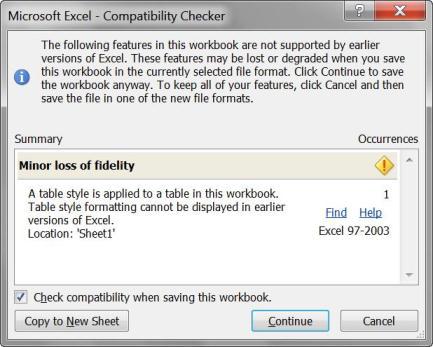
Pretending you email me the file and I save it in Office 2007. By default the encryption will remain in RC4 but I can change that manually be amending the Crypto Provider. I would be given a warning similar to the one below (I couldn't find the right message) but instead of saying a "Minor loss of fidelity" it would warn me that the file could not be opened in earlier versions.
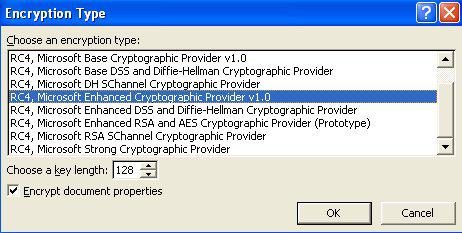
This is the Crypto Provider screen which can upgrade or downgrade the cryptography in an XLS (or XLSX) file. Most users would never understand or encounter this.
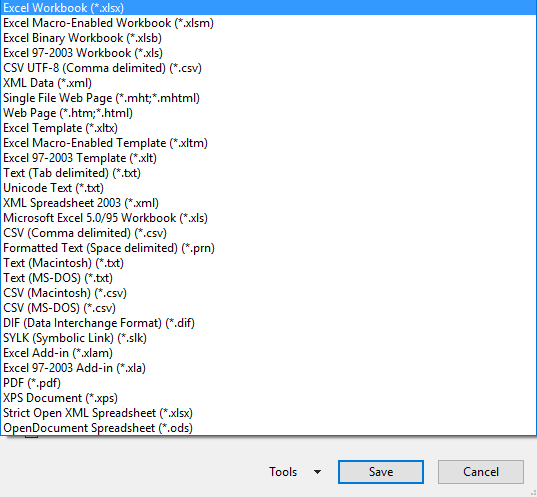
The latest versions of Excel have a number of formats and Excel is smart enough to recognise that in a 97-2003 Workbook that the encryption needs to be RC4 and the user would have to manually change the Crypto Provider to work otherwise.
XLS has always been a very flexible format but you're correct about the specification, it's extremely complicated.

For most users saving in the latest versions of Excel, with a secure password, they have no fear about the security unlike in olden times of Office. The default option is suitably secure even as AES128, 100,000 iterations at SHA1.

Reply to this topic

Posting as a guest. Log in or sign up to get reply notifications and edit your posts.

Tip: describe your AxCrypt version, operating system and the exact error message. Never post your password or license key.