

I recently installed the Creative update on Windows 10, now when I start AxCrypt I get 'unhandled exception: bad IL range" and the app doesn't start at all. Running 2.1.1502.
AxCrypt won't start after Windows update
Actions
Reply10 replies

Guest
There's no "Creative Update", there's the Creators Update (1703) which was an upgrade from the Anniversary Update (1607).
Next, please uninstall AxCrypt and then install the latest version (2.1.1541.0).
The download for the latest version of AxCrypt can be obtained by clicking the link.

AxCrypt Support
AxCrypt Team
· 1,810 posts
Thank you Tim! Good advice.
Guest
Topic starter
No luck, same problem. Has anyone else seen this?
Guest
I'm running the Creators Update as well Anonymous and have no issues either with Windows or AxCrypt.
Could you try posting a screenshot so we can all see exactly what error you're receiving?
▼ That's my version of Windows, if you press WinKey + R and type in 'winver' (without the quotes) and enter, it'll tell you what version of Windows you're running. This is the latest stable version.

Guest
Another Windows 10 user here.
We're on the Enterprise, delayed-release 1703 branch and there's no problem using AxCrypt 2.1.1541.0.

Guest
No problems with AxCrypt for me either.
AxCrypt Support
AxCrypt Team
· 1,810 posts
Anonymous,
Please contact support and we'll try to help you out there. support att axcrypt dott net .

Guest
Hello,
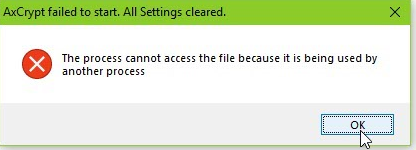
After the latest Windows update, AxCrypt will not start, so I cannot open any of the encrypted files.
Guest
We can't help you Paul until you give us some further information. Follow the instructions of George and then post back the exact version of Windows that you're using.
You could also try uninstalling AxCrypt, restarting your computer and then installing AxCrypt again. That normally fixes any problems introduced by Microsoft.
The latest stable version of Windows is 1703 (OS Build 15063.786)