


Hello Dean,
Sorry to see AxCrypt take the blame here, because it's not an AxCrypt problem. You have asked windows to associate a TurboTax file with Adobe Acrobat Reader. Not AxCrypt. AxCrypt can't do that.
The screen shot clearly states that Adobe Acrobat Reader is trying, and failing, to open "2016 Hauser D Form 1040 Individual Tax Return.tax2016". That's not a PDF file. It does not end with ".pdf". It ends with ".tax2016".
See for example https://fileinfo.com/extension/tax2016 .
All kinds of files such as Word Files, PDF files, JPG files, TurboTax files, AxCrypt files etc contain information that only the respective (or compatible) application can interpret and present to you as the user. For example, TurboTax cannot open an AxCrypt-file. AxCrypt cannot open a Word file, or a TurboTax file.
AxCrypt opens AxCrypt-files.
Word opens Word-files.
Acrobat Reader opens PDF-files.
TurboTax opens TurboTax-files.
The way the operating system knows what to do with a file when you double-click it is by 'associating' the file extension with the correct application. So:
AxCrypt should be asssociated with ".axx".
Word should be associated with ".docx".
TurboTax should be associated with ".tax2016".
Acrobat Reader should be associated with ".pdf".
If Windows doesn't know what to do with a file, let's say ending with ".tax2016", it'll ask you as a last resort:
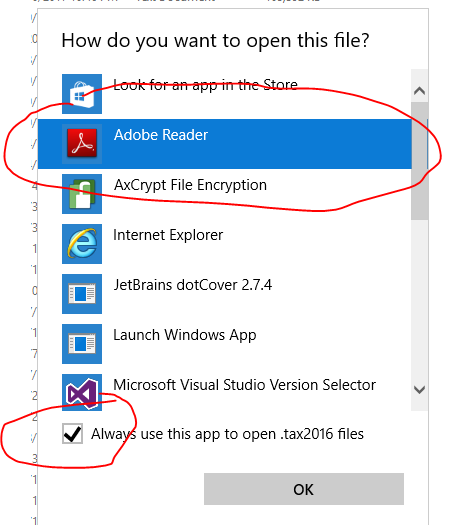
Now, that's a pretty dumb suggestion by Windows, both suggesting Acrobat Reader, and suggesting you make this the default for the future. Nevertheless, that's not an AxCrypt issue.
If you click 'OK' here, you'll get the result you sent a screen shot of, because you have now asked Windows to try to use Acrobat Reader to open something that is in fact a TurboTax File, not a PDF file.
The solution is *not* to rename the file to end ".pdf". You'll get the same result.
In this case, you need to ensure that you actually have TurboTax installed - only TurboTax (or possibly other compatible software, which Acrobat Reader and AxCrypt are not) can open TurboTax-files. Once it's installed, you also have to ensure that the file association above is correct, which it might not be since you now have established an override over the default.
If you find this confusing, please don't blame AxCrypt! We did not design this system. Microsoft did.


