Secure file encryption since 2001
Bugs & issues

Folder decryption works only part way

15 replies 5 participants Started Active

Actions

Reply
AxCrypt Support AxCrypt Team
· 1,810 posts
Report spam

Thanks Franz,

Last(?) question...

From what you're saying (and what I gleaned from the cursory glance at the office spec for cryptography and XLS), and from the screens above, it seems like the default behavior for saving a .XLS file even in modern versions of Excel is compatible with Excel 97 - 2003 which would imply that such a save has the weaknesses these versions of Excel has.

So, assuming a non-expert non-cryptography-setting-tweaking user, it's still a fairly safe assumption that a .XLS file if password protected is protected with the old weak form of Office crypto - right?

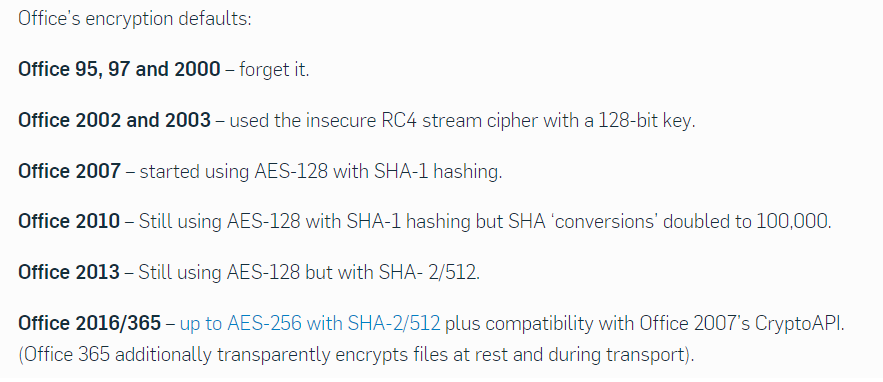
If the file is saved in .XSLX-format, it's also a fair assumption to make that it is saved as AES-128, once again assuming the non-tweaking user. So your last statement "For most users saving in the latest versions of Excel, with a secure password, they have no fear about the security unlike in olden times of Office. The default option is suitably secure even as AES128, 100,000 iterations at SHA1." is valid when the file is saved as .XLSX in a newer version of Excel.

Franz Guest
Report spam

it seems like the default behavior for saving a .XLS file even in modern versions of Excel is compatible with Excel 97 – 2003

That is the default behaviour if the user selects .XLS.

The cryptography is downgraded to RC4 if the user selects the .XLS format and they're not warned about the legacy encryption which will be used.


So, assuming a non-expert non-cryptography-setting-tweaking user, it’s still a fairly safe assumption that a .XLS file if password protected is protected with the old weak form of Office crypto – right?

Generally speaking, yes. Some workplaces manually force the Crypto Providers through group policy to comply with FIPS etc. If this the case then all bets are off.


If the file is saved in .XSLX-format, it’s also a fair assumption to make that it is saved as AES-128, once again assuming the non-tweaking user

Yes. Also .XSLX is the default format now for Microsoft Excel and the majority of spreadsheets I've seen in the last decade have been .XSLX.


Here's some more information that may help the original poster if he's forgotten his password, and for you as a background reference,

https://www.elcomsoft.com/help/en/aopr/office_2007_password_to_open.htm

https://www.elcomsoft.com/help/en/aopr/index.html

https://www.elcomsoft.com/aopr.html

Their  software can be purchased to crack some passwords instantly, remove editing passwords, crack opening passwords, use mask attacks, rainbow tables or brute force against Microsoft Office. It's extremely slow for short passwords from 2013 onwards but from 2007 it might help for short passwords but it's useless if they've got a long password set.

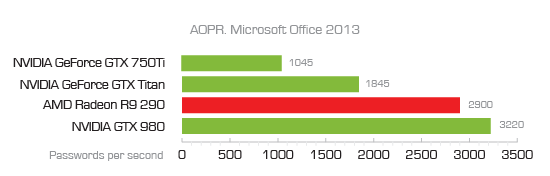
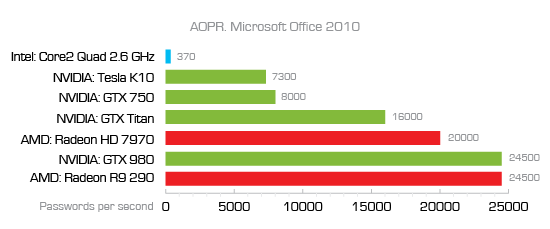
Each version has successively got more secure - look at the difference!

  • 2010 - 24,500 passwords per second
  • 2016 - 3,220 passwords per second

You can accelerate some of the older versions, or modern versions, via distributed computing using their software but it's not worth it and there's little chance of success.

Franz Guest
Report spam

By coincidence Sophos have published an article today titled Are you encrypting your documents? Here’s what happens when you don’t and it covers Microsoft Office encryption. (Oddly, their article doesn't recommend (or even discuss) their own encryption products!))

Their conclusion about Microsoft Office is:

"The simple takeaway is that only the encryption offered from Office 2013 onwards is worth relying on, but any encryption is better than none, even versions with theoretical weaknesses."


Franz Guest
Report spam

My own opinion on their article is that the security from Office 2007 onwards is good enough because the SHA-1 collisions found by Google don't represent sufficient danger. But the encryption from 2013 onwards is even better.

Reply to this topic

Posting as a guest. Log in or sign up to get reply notifications and edit your posts.

Tip: describe your AxCrypt version, operating system and the exact error message. Never post your password or license key.