Secure file encryption since 2001
Help & support

Basic Questions about AxCrypt

3 replies 3 participants Started Active

Actions

Reply
Steven Guest
Report spam

Hello, I have not been able to locate answers on your web site...Please help

=============

Will either the Free, or Subscription version, Allow me to store my data on my iPhone, iPad, and Mac Locally ?

I do NOT want to store or share/send any data via the internet, Cloud, email… Will the Free version work for me with this restriction, or do I need to Subscription version?

=======================

per your web site:

our mobile apps do not yet have the capability to encrypt or update encrypted files on mobile devices

Does this mean the the data on my iPhones will, or will NOT be Encrypted

===========================

If I sign out of AxCrypt on my iPhone or Mac, will I be required to input my password when I open in and sign in the next time?   I prefer to input my password each time I need to use the app.

===========================

Can my Encrypted Folders be Alphabetized automatically within AxCrypt

===========================

Thanks

Steven

3 replies
AxCrypt Support AxCrypt Team
· 1,810 posts
Report spam

Hello Steven,

No version of AxCrypt stores any file data anywhere else than your local device. We never upload any of your file content to our servers. On our servers we store public and (encrypted) private keys, general account subscription status and if you're using our password manager, we'll store your encrypted passwords there - but only if you're using it.

The restriction on mobile apps is that we can't encrypt or update already encrypted content on your mobile device. The files must be encrypted on a desktop device, and imported in a manner of your chosing to the mobile device. On the mobile device, they will be (temporarily) decrypted in order to be viewed.

If you sign out of AxCrypt on your mobile or desktop device, you're always required to re-enter your password.

Not exactly sure what you mean with 'Alphabetized', but you can click the header and sort the list of encrypted folders alphabetically.

Since it's free to try all features, including the mobile apps, up to 30 days the best way to answer most questions is to try it out!

right clicking a file to encrypt/decrypt Guest
Report spam

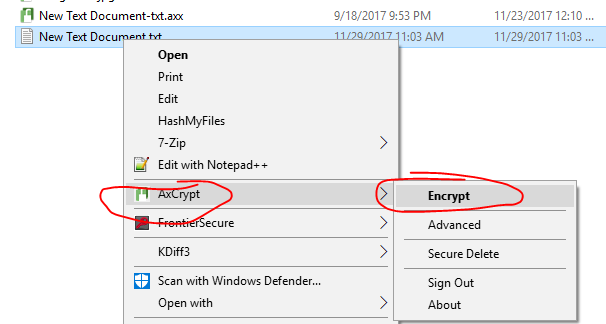
On the old version 1.7 I was able to right click and encrypt or decrypt a file.  The new version does not do this or did I set it up wrong?

Reply to this topic

Posting as a guest. Log in or sign up to get reply notifications and edit your posts.

Tip: describe your AxCrypt version, operating system and the exact error message. Never post your password or license key.