Secure file encryption since 2001
Help & support

axcrypt 2 and not showing in task bar

3 replies 3 participants Started Active

Actions

Reply
Alan Guest
Report spam

greetings all,

win 10, axcrypt 2,  2 questions

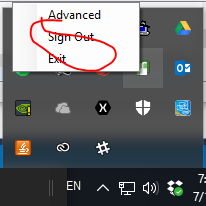
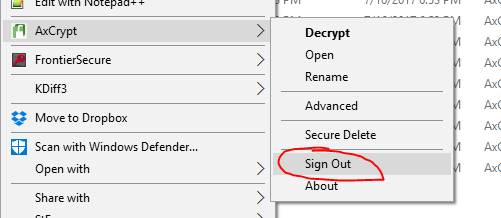
1) there is no axcrypt icon in the task bar, so when I finish with a file and want to close my "axcrypt session", I need to open task manager and  force close running app.  Is there an easier way to close the axcrypt app?

2) I would like to use the axcrypt app offline most of the time, how do I arrange this? (wifey says turn off the net:-)  )

thanks,

ps, a couple of suggestions  ,  put a search function on the community forum and (2)clearly show the sign in is also the password, maybe  label it as" password"

3 replies
George Guest
Report spam

Alan,

To answer your second question:

File > Options > Always Offline

This is the preferred mode of the security conscious although you can't be a Premium User if you're always offline - unless you activate online first.

AxCrypt Support AxCrypt Team
· 1,810 posts
Report spam

Thanks George - forgot to answer that one!

As for the need to be online to be Premium, we'll be supporting offline licenses in the not-to-far distant future. You'll still have to download the license from our web site, so then you need to be online, but they resulting license file can be transferred to an air-gapped computer with no Internet access - or just a computer where AxCrypt is always offline, but the browser is not.

Reply to this topic

Posting as a guest. Log in or sign up to get reply notifications and edit your posts.

Tip: describe your AxCrypt version, operating system and the exact error message. Never post your password or license key.