



Forum Replies Created
-
AuthorPosts
-
December 28, 2016 at 09:37 in reply to: File password needed – I never set one though. Please Help!!! #5015
Hi Sugs,
We can send you a program that handles some situations. The problem is that it’s really hard to write a general purpose software that can interpret instructions like “a sentence with three or four numbers and special characters in the end“.
The software we have can do it to a certain degree, but it’s not entirely simple to use. We cannot give much support either, so what you should do is to encrypt a new file with a known password, and then try the brute force software out with a suitable pattern and verify that you understand the operation, and that it does find the (known) password as expected.
Then you can do the real search. Be prepared for a long wait if there are many possible combinations to try.
Please send an email to support@axcrypt.net and we can arrange for you to receive the software.
Hi Paul,
Trust, but verify, right?
AxCrypt (the client) will fallback to offline mode even during first time registration if our servers are unavailable, for whatever reason (no Internet, we’re out of business, we’re under attack etc).
So, if this happens, we’ll generate an AxCrypt ID (the key pair) offline, and at the first opportunity (if ever) we’ll synchronize with the server and update the key pair at both ends. If our servers are never reached, it all works without them. You just need to know the password used to encrypt older files. If it’s different from the one you set during the offline registration, you’ll be prompted for the file password.
Here are a few screen shots from AxCrypt being installed from scratch on a computer where the DNS name resolution was modified so that ‘account.axcrypt.net’ (our server) went to empty space – i.e. the same effect as if our servers are down and non-responsive. The same thing happens if DNS cannot resolve the name at all, or if the connection is blocked by a firewall, or if your computer just does not have Internet connectivity.
After entering an email in the dialog you show (that just has to ‘look’ like an email), you come directly here, no prompt for verification code:
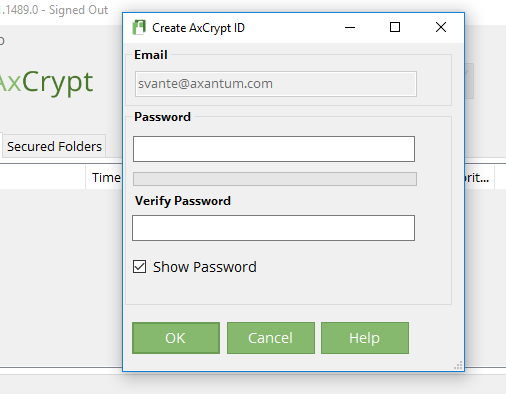
Then, after setting a password, we’ll generate a 4096-bit RSA key pair locally. This takes time.:
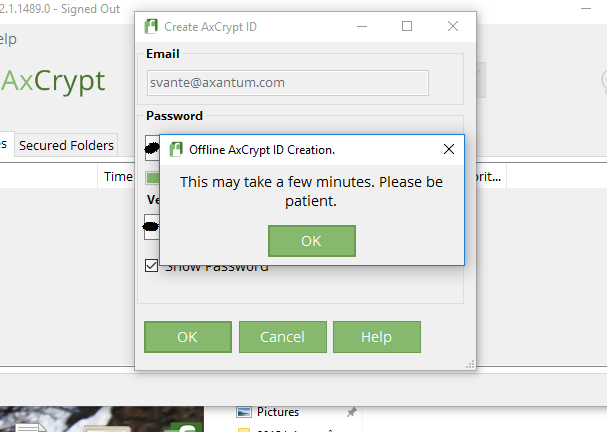
Finally, after signing in, it’s as usual – but you’re offline. Check the title bar.
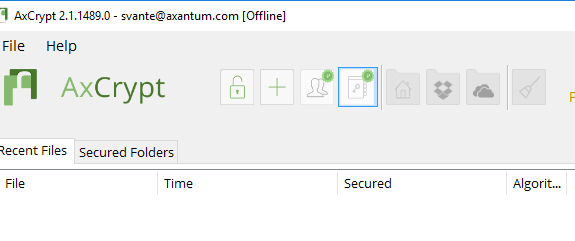
Now all works as normal, except you’re offline and your key pair is locally generated. But you can still open any file as long as you know the password originally used. As mentioned – the key pair is used for convenience and for the key sharing feature, when you share encrypted files with other recipients.
As mentioned, as long as you have the software and know the password, you do not need our servers to even exist on the Internet, much less any Internet connection at all in order to continue to use AxCrypt.
-
This reply was modified 9 years, 3 months ago by
 AxCrypt Support.
-
This reply was modified 9 years, 3 months ago by AxCrypt Support.
December 27, 2016 at 10:48 in reply to: File password needed – I never set one though. Please Help!!! #4984Hello Sugs (& Napoleon),
The problem seems indeed to be a case of a forgotten password. There’s no need to downgrade to 1.7 to try decryption there, version 2 will open old files too.
As Napoleon says, if you can narrow down the possibilities, a brute force attack may work. In fact, you may perhaps try it manually – just open notepad or excel and then systematically type all the variants you think likely and then try them one after another.
There are no limits in AxCrypt to how many times you can try a ‘File Password’. The sign in prompt, which interacts with the server if you’re connect to the Internet, does have a limit.
Hello,
Thanks for all the feedback! We will be adding an option to always prompt for the password. You can follow and monitor the progress here: https://bitbucket.org/axantum/axcrypt-net/issues/186/add-option-for-requiring-password-every .
Hi Paul (& Lucas),
I need to correct Lucas on one point. AxCrypt is a password based file encryption utility. The AxCrypt ID key pairs used are for convenience in sharing and managing passwords. You will not lose your encrypted data if you lose your key pair. You can *always* decrypt a file if you have the software and know the password that was used when the file was encrypted.
In order to ‘nuke’ AxCrypt completely, it generally suffices to uninstall it via the control panel. Nevertheless, there are scenarios where some user and configuration data could be left on the computer. AxCrypt uses the following locations:
%localappdata%\AxCrypt in the file system for user data. This is always safe to ‘nuke’, even with AxCrypt installed (temporary decryption is done here, so working files may be deleted if you delete this folder entirely, but the installation as such will not be damaged).
HKLM\Software\AxCrypt
and
HKCU\Software\AxCrypt in the registry for configuration data pertaining to the Explorer integration, and the Windows Installer engine.
(It also adds file some shell integration stuff elsewhere, but that has no impact whatsoever on the ‘nuke’ aspect, and also these are removed during uninstallation).
The standalone version of AxCrypt, which does not require installation, does not use the registry at all but only the %localappdata%\AxCrypt location.
Hi Robin (& Lucas),
As Lucas says, no there’s no connection with AxCrypt. Lucas is just an engaged member of the community, for which we’re grateful. He’s in his full right to point out alternatives, and I am very much for an open, honest and objective climate in these forums so I’m perfectly fine with suggestions for alternative softwares or solutions. AxCrypt is not perfect, not in version 1, not in version 2. Nor is any other product.
We’ll be continuing to develop AxCrypt and for this to go in the right direction, we need input – be it positive or negative.
As mentioned elsewhere, we will be providing the option to request the password every time as a result of feedback. We may indeed also implement some model of use which is closer to the version 1.x, but that remains to be seen. Lucas is of course right that the AxCrypt 2 model does open up a few more attack vectors, but in each case we judge the benefit to be worth it. We are trying to make a product that is really useful for a large number of users, and this means we have to make tradeoffs from a theoretical zero knowledge model, in order to make the product useful in practice.
Finally, AxCrypt is indeed mostly suited for data transmitted over the Internet (i.e. email attachments), or stored remotely (i.e. cloud services, backups). For local device security I do indeed generally recommend full disk encryption or possibly file system level encryption such as Windows EFS, which is often well complemented by file encryption such as AxCrypt. Using file encryption software (be it AxCrypt, 7-zip or MS Office built-in) leaves quite a few holes on a local computer, that are more or less impossible to plug in the softwares themselves (temporary files, swap files, wear levelling in SSD etc). These holes are plugged very efficiently by full disk encryption. Similar arguments, but even more so, apply to mobile devices.
So, our recommendation is to use some kind of device or full disk encryption for local device security + some form of file level encryption for remote storage and transmission (we think AxCrypt is a good choice).
December 27, 2016 at 10:09 in reply to: Cannot use AxCrypt to keep my local files secure from other local people #4980Hi Paddy (& Lucas),
We will be adding an option for “require password every time”, since it is such a frequent request. We really don’t agree with this, since we think it encourages other unsafe practices such as sharing a Windows Login between different users – even in a family. Nevertheless, it seems like the line of least resistance ;-)
On the case of passwords stored using AxCrypt, I’d like to point out that with the Premium subscription you’re also getting our Password Manager, which is both less costly and in many ways simpler to use than many other similar services. It is available for use from any device with an internet connection, including mobile devices.
Hi Neal,
Your “per-file” option is actually quite an interesting idea. Thank you. We may indeed do just that. Watch https://bitbucket.org/axantum/axcrypt-net/issues/186/add-option-for-requiring-password-every for progress.
Hello Paul!
You’re misinformed fortunately. As opposed to Cloudfogger, you can decrypt your AxCrypt files at any time, with or without Internet, and with or without our servers or our business being operational.
As long as you have a copy of the software (and that’s pretty much spread around the Internet by now), and know the original password you can continue to use and decrypt your AxCrypt-encrypted files.
Hello Robin,
You should use the “Erase Data” option if someone tries your passcode too many times. As mentioned, even if we did require the AxCrypt password every time, a phone is such a locked down environment that we could not guarantee it to be clean anyway.
The iOS level of protection against passcode attempts is actually pretty solid. The FBI did manage to get around it in an old iPhone 4S after several months and paying an undisclosed (but presumably significant) amount of money to a third party to bypass the protection. More recent versions of iOS does not have that particular vulnerability.
Hi Neal,
Thanks for your input!
They say the customer is never wrong, but to be honest I have a hard time with this rather frequent request. I’m assuming you’ve read https://forum.axcrypt.net/blog/leaving-computer-axcrypt/ which is a longer dicussion about this.
But, yes, we’ll be adding a number of dangerous options like this one. I really, really think that it tends to reduce security because of the increased threshold of use and the likelyhood of avoiding long and strong passwords. But, we will add it as an option.
Stay tuned! Now the mobile apps are out, we’ll have more resources to work on the desktop application.
Earlier this week we released AxCrypt Mobile for Android.
https://play.google.com/store/apps/details?id=net.axcrypt.axcrypt2x
We also just released AxCrypt Mobile for iOS.
Thank you for your support.
Enjoy!
Earlier this week we released AxCrypt Mobile for Android.
https://play.google.com/store/apps/details?id=net.axcrypt.axcrypt2x
We also just released AxCrypt Mobile for iOS.
Thank you for your support.
Enjoy!
Earlier this week we released AxCrypt Mobile for Android.
https://play.google.com/store/apps/details?id=net.axcrypt.axcrypt2x
We also just released AxCrypt Mobile for iOS.
Thank you for your support.
Enjoy!
Earlier this week we released AxCrypt Mobile for Android.
Now we have released AxCrypt Mobile for iOS.
https://itunes.apple.com/us/app/axcrypt/id1157695909?mt=8
Thank you for your support.
Enjoy!
-
This reply was modified 9 years, 3 months ago by
-
AuthorPosts