



Forum Replies Created
-
AuthorPosts
-
Hello Don,
Perhaps your download is broken or you have not downloaded from our site https://forum.axcrypt.net ?
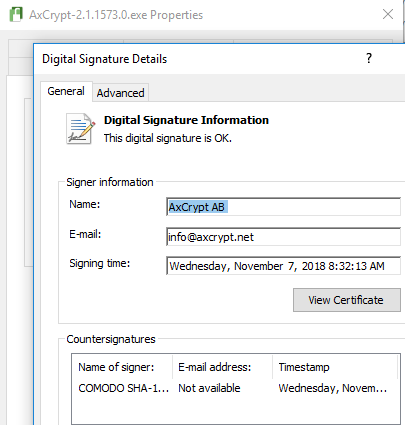
The standalone executable has a valid digital signature. This was just downloaded directly from our site:
-
This reply was modified 7 years, 3 months ago by
 AxCrypt Support.
Hello Annie,
You enable the feature “Include Sub Folders” and then select the files and folders you want to decrypt.
Hello Don,
Not 100% sure what Windows PD is… But googling the message seems to point to Smart Screen as a possible culprit. You can also check and verify the digital signature of the executable.
Hello FinalBytes,
I am sorry, but at this time we don’t have an option for a personal message – but we definitely should and also support the option of you as inviter selecting the recipient language. We’ve added two new issues for this. Thank you for the suggestion, we will certainly implement this, although it may take a little while.
https://bitbucket.org/axantum/axcrypt-net/issues/445/when-inviting-users-allow-the-inviter-to
https://bitbucket.org/axantum/axcrypt-net/issues/446/when-inviting-a-user-a-free-text-fieldHello jeff,
Can you please be more specific about “does not open”? A screen shot is preferable.
From what we can see in our logs, you registered the account in 2016, then you’ve not used it until beginning of November at which point you issued a password reset, indicating that the original password was forgotten.
Again no activity until yesterday mid December, at which point you once again issued a password reset.
With infrequent use, it is easy to forget or become uncertain about just what password is used for what account.
It also seems you are using a very, very old version of AxCrypt, which you under any circumstance should update unless you have done so now.
Hello ahmed,
Can you please send a screen shot?
Hello Winston,
Can you send screenshots of the situation please?
Hello Roger,
Yes, I agree. It seems your situation has become confused so if you can start over, do so. Also, you might want to take the time to watch a few brief videos we have on https://forum.axcrypt.net/ .
There are no special gotchas for uninstall / reinstall of AxCrypt. If you uninstall, the files remain encrypted, but you can’t open then because you don’t have AxCrypt. Reinstall just installs the software. You still need to know the password.
Hello!
Thanks for the feedback, and we certainly agree. We do have a viewer app on Android, our experience is that the majority of use on the phone is to read content, not create content so that’s where we put the priority.
Hello Chris,
It seems the age of miracles is not quite over yet then! Happy to hear it, and good luck!
Hate to be a pest, but I’d really like to know what the version number is… Preferably with a screenshot. We’ve had many issues with users downloading from unofficial sites and in other ways not actually running the “latest”.
Hello Chris,
What version of AxCrypt are you running?
Hello Roger,
I don’t quite understand what you mean with “the need to sign in with a different password to get onto the website for ‘enabling’ purposes escaped my attention. How do I deal with that issue?”.
AxCrypt (the app! not the web!) does require you to to sign in – but not to the web site. It is the same password, but you do not need to use the web site at all.
If the file was originally encrypted with a different password than used to sign in to AxCrypt (the app! not the web!), then AxCrypt will ask again for the file password.
When I write “Sign in/out to AxCrypt” above, I mean to the desktop app – not the web! Forget the web for now.
Hello Roger,
Thank you for the info and screen shots.
The problem here is that the *file* is encrypted with a different password than what you use to sign in to AxCrypt with. You need to know the password the file was originally encrypted with.
What you appear to have done is to reset your sign in password to AxCrypt. That does not change the requirement to know the password originally used to encrypt a file – if it did, our encryption would not be much worth ;-) .
Try the following:
Sign out of AxCrypt.
Create a file “New document.txt”, edit it, add some text, save and close *all* instances of Notepad.
Sign in to AxCrypt.
Right-click the file in Windows Explorer and select ‘AxCrypt | Encrypt’. The file should become encrypted, and be renamed to ‘New document-txt.axx’.
Sign out of AxCrypt.
Sign in to AxCrypt.
Double-click the file ‘New document-txt.axx’.
The file opens in Notepad.
Close all Notepad windows (there should be only if you followed the instructions).
You do not need to visit the web site, and a file encrypted when you are signed in is automatically opened without the need to type a password again – as long as the file actually is encrypted with the sign in password!
Hello David,
You can’t use ‘File | Open’ and similar functions from within an application when the file in question is encrypted with AxCrypt.
You have to open it from AxCrypt (or in Windows, from Windows Explorer by double-clicking).
-
This reply was modified 7 years, 3 months ago by
-
AuthorPosts