



Forum Replies Created
-
AuthorPosts
-
Hello Dean,
Sorry to see AxCrypt take the blame here, because it’s not an AxCrypt problem. You have asked windows to associate a TurboTax file with Adobe Acrobat Reader. Not AxCrypt. AxCrypt can’t do that.
The screen shot clearly states that Adobe Acrobat Reader is trying, and failing, to open “2016 Hauser D Form 1040 Individual Tax Return.tax2016”. That’s not a PDF file. It does not end with “.pdf”. It ends with “.tax2016”.
See for example https://fileinfo.com/extension/tax2016 .
All kinds of files such as Word Files, PDF files, JPG files, TurboTax files, AxCrypt files etc contain information that only the respective (or compatible) application can interpret and present to you as the user. For example, TurboTax cannot open an AxCrypt-file. AxCrypt cannot open a Word file, or a TurboTax file.
AxCrypt opens AxCrypt-files.
Word opens Word-files.
Acrobat Reader opens PDF-files.
TurboTax opens TurboTax-files.The way the operating system knows what to do with a file when you double-click it is by ‘associating’ the file extension with the correct application. So:
AxCrypt should be asssociated with “.axx”.
Word should be associated with “.docx”.
TurboTax should be associated with “.tax2016”.
Acrobat Reader should be associated with “.pdf”.If Windows doesn’t know what to do with a file, let’s say ending with “.tax2016”, it’ll ask you as a last resort:
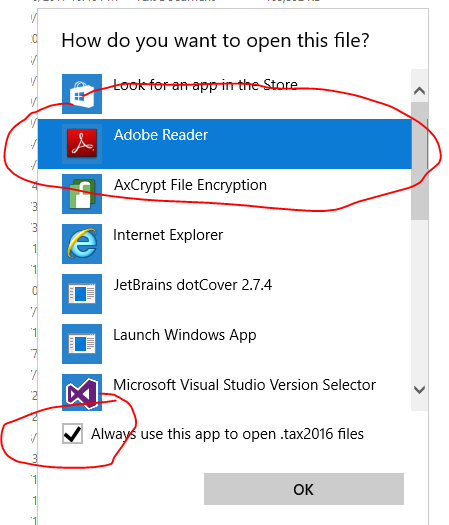
Now, that’s a pretty dumb suggestion by Windows, both suggesting Acrobat Reader, and suggesting you make this the default for the future. Nevertheless, that’s not an AxCrypt issue.
If you click ‘OK’ here, you’ll get the result you sent a screen shot of, because you have now asked Windows to try to use Acrobat Reader to open something that is in fact a TurboTax File, not a PDF file.
The solution is *not* to rename the file to end “.pdf”. You’ll get the same result.
In this case, you need to ensure that you actually have TurboTax installed – only TurboTax (or possibly other compatible software, which Acrobat Reader and AxCrypt are not) can open TurboTax-files. Once it’s installed, you also have to ensure that the file association above is correct, which it might not be since you now have established an override over the default.
If you find this confusing, please don’t blame AxCrypt! We did not design this system. Microsoft did.
Hello Roger,
We should definitively warn (actually not accept) forbidden folders as watched folders. If it’s any consolation, they should be ignored since they are on the forbidden list. But they should not even be accepted. See https://bitbucket.org/axantum/axcrypt-net/issues/298/secured-folder-should-forbid-adding . Thanks!
As for SSL thumbprints, the thumbprint is not intended to be used for security, but for reference (i.e. to easily identify which certificate to use from a certificate store etc). You should only validate the certificate based on the trust.
An attacker can’t “inject fake tumbprints in real time”, it’s just a hash of the certificate, it’s not an integral part of the certificate.
Still, it doesn’t hurt, but the important part is really that it’s issued by the correct trusted authority. If you’d like to protect against various forms of man-in-the-middle scenarios, you should verify that it’s issued by the right authority – not any authority that your computer happens to trust, which may be more than you want – perhaps due to an attacker or your company having injected their own root certificate as trusted.
Anyway, see the updated https://forum.axcrypt.net/cryptographic-hashes-files/ .
Hi All,
I understand the confusion. Yes, the right-click context menu was actually recursive before this new option. The reason for that is that the list of files to encrypt is actually expanded before sending it to AxCrypt for encryption, it’s done by the shell extension – not AxCrypt proper, and it was the old behavior of old AxCrypt so we tried to keep that.
The new feature is about what happens when you use the AxCrypt main window, and more specifically, when you use the “Secured Folder” feature – where a folder is watched for new unencrypted files and can encrypt them automatically, or semi-automatically at the click of a button.
It’s dangerous because not all understand the consequences of, let’s say, encrypting their entire Google Drive or Dropbox. We do try to forbid known dangerous locations, specifically the root folder, the program files directory and the windows directory.
We debated whether to remove the recursiveness of the shell extension for consistency, but decided against so as not to antagonize the current free users who might depend on that function. We try to play as nice as we can, while still trying to give incentives to upgrade to Premium so we can continue to develop the software. With a few exceptions (anonymous rename, shred and delete) we try to stick to “If it was available in AxCrypt 1.x, it’s free. If it’s a new function or feature, it may be free or it may be part of the Premium Plan”.
Hi Dean,
Last things first 4) and 5) – why can you open files without entering a password?
AxCrypt 2 works just like your email software or most other password-protected systems. You sign in once, and remain signed in until signed out. Just like you can read many emails without entering the password every time, AxCrypt will do the same. The files are still encrypted, but your password is remembered until you sign out of AxCrypt.I think there is some misunderstanding when you say “I signed out of AxCrypt, but I can still open them.” That’s not how it works. Can you show exactly how you do that?
1) Recent files is a common concept in many document oriented programs. It’s a list of, well, how to say it? Recently used files. It’s a convenience for quick access.
2) If you have trouble understanding the concept of Secured Folders, ignore that for now. Secured folders are monitored for new files, so you can encrypt them with a single click using the “clean” broom.
3) To “clean” up is just that – cleaning up temporary files. AxCrypt works by decrypting to a temporary location, and opening from there. Sometimes you need to tell it to clean manually. Also, it encrypts new files in Secured Folders.
Hello Joseph,
I’m not sure, but I think you’re running in system configured to have FIPS compliance enabled . See https://support.microsoft.com/en-us/help/811833/-system-cryptography-use-fips-compliant-algorithms-for-encryption,-hashing,-and-signing-security-setting-effects-in-windows-xp-and-in-later-versions-of-windows .
I am not sure exactly what component it is referring to that is not FIPS compliant.
Hello Dean,
It’s a little hard tell from your screen shot, but the reason only “Decrypt” is offered, is because the file in question is already Encrypted. I think you got confused about what file you selected to “Stop securing and remove from list”. Try again, and keep track of exactly what file you’re working with and I think you’ll find that it works as expected – as long as the file is not in a Secured folder!
If the file in fact is located in a folder designated as “Secured”, it will soon be re-encrypted again since those folders are monitored for unencrypted files and will encrypt them when you sign out, or click the “Broom” clean up icon.
AxCrypt uses a single sign on method of password use. There is only one password for all encryption and decryption operations, and AxCrypt will stay signed in, and use the same password until signed out. That’s why you’re not prompted for a password when encrypting new files. This is also to reduce the risk that users get confused about what password was used to encrypt what files, or worse mistype the password and not detect it until much later.
Hi Dean,
Sorry, but those screen shots are really necessary… If you don’t succeed in including them here like other users, attach them to an email and send the full request to support att axcrypt dott net .
Hello cass,
We will never lock you out of your files due to downgrading of the plan. AxCrypt will continue to work and open any and all AxCrypt-encrypted files regardless of source as long as you know the password. The Premium features will become inactive however, such as the ability to key share (not to receive key shared files, but to originate them), the mobile apps, stronger encryption (but you can always decrypt files even when encrypted with the stronger Premium level encryption) etc.
Hello cass,
Yes, although the ‘recent files list’ will remove the files when they appear to have ‘disappeared’. But the files remain encrypted, and will open with AxCrypt.
Hello Don,
What you describe is extremely unlikely to be caused by AxCrypt. It is perfectly compatible with Windows 8.1, and it has no concept or reference whatsoever to “windows update files”.
Please contact our support, and be sure to include screen shots of the actual problem situations, and we’ll try to help you sort things out, or at least narrow it down to what component is actually the problem here if it’s not AxCrypt.
May 21, 2017 at 10:33 in reply to: la aplicacion gratuita no cifra carpetas.sino unicamente archivos individuales. #6432Hello yazmin diaz,
AxCrypt is a file encryption software, not a folder or drive encryption software – this is regardless of if you’re on the Free or the Premium plan. There are advantages, and disadvantages, to this approach but that’s how it works anyway.
The Premium version will be extended next week with a function to keep entire folder structures encrypted though.
And, I’m sorry, we don’t speak spanish here, but Google Translate works quite well!
Hello Cyborg,
This is indeed an interesting feature to introduce. After the release of the Mac version in a few weeks, we’ll start work on the next level of AxCrypt – AxCrypt Business. This will be a plan for business, and will include the possibility to purchase for groups of users, key recovery and some customization with graphics and internal help links. Your audit trail suggestion would be an excellent addition to that feature list.
We will look into more details how such an audit trail would be generated, used and saved.
Hello Cyborg & skipro,
Development is finished, and there’s just some testing to be done before release, planned next week. Just so it doesn’t come as a surprise, this feature is a part of the Premium Plan.
Thank you Hades!
Hello Tom,
Person A (Alice) get’s the public key from person B (Bob) by asking our server for it when you enter Bobs email address as a person to share it with.
If Bob isn’t yet an AxCrypt user, our server will generate the key pair (public and private), and send Alice the public key while encrypting the private key using our transient key for the purpose, and also send an invitation to Bob.
Bob, when he recieves the invitation goes to our server, sets his password at which point the transiently encrypted private key is re-encrypted with his password.
Bob needs AxCrypt (or compatible software).
All encryption software, public/private or symmetric, depend on the the application software. Of course, some application software is compatible with others, but it’s really quite arbitrary. There is no such thing as “the” standard for file encryption. AxCrypt is actually among the top contenders to become a defacto standard, but nobody is there yet.
-
AuthorPosts