



Forum Replies Created
-
AuthorPosts
-
Hello all!
Just a quick note from me, Svante, the developer of both AxCrypt 1 and 2.
To be honest – I’ve only read through the longer posts superficially, but I think I get the general drift. First some undisputable facts:
– AxCrypt 1 was made by me, myself and I with my own private fully own one-man company Axantum Software AB. (AB is a swedish form of incorporation, somewhere between LLC and Inc.),
– AxCrypt 2 is made by me and small team of developers, designers, etc from the company AxCrypt AB in which I am co-owner and co-founder which has the rights to use the AxCrypt brand, sites etc, granted by Axantum Software AB.
AxCrypt 1 is a Windows-only simple password based AES-128 file encryption software written in C++, which has on the plus-side been very stable for almost 15 years, and on the minus side not really been developed at all for 15 years. The cool thing is that it’s still useful! AxCrypt 1 is entirely free and only released under the GPL license.
AxCrypt 2 is multi-platform hybrid client and SAAS infrastructure which includes a key server for public key based secure sharing of encrypted files, a online password manager, and support for AES-256 and RSA-4096 for the PKI parts. It is written in C# and currently is released on Windows, Android, iOS. Soon Mac OS X. We may even go Linux it’s not a big step. AxCrypt is GPL open source and free for some functionality on the Windows platforms. Advanced features, keyserver, stronger encryption, other platforms require a paid subscription plan.
Just clearing those things up first.
Then, apart from some issues with the tone of voice in the discussion, I essentially agree. Yes, both are right.
What I want AxCrypt to be, and I think it is until proven otherwise, is properly implemented strong encryption with clearly defined security and as simple a model as possible to analyze. There are always attack vectors, and we try to be very open with what they are. We want this strong encryption utility to be packaged in such a simple and easy to use package, that just about anyone can install it and use it.
I will not agree that I think AxCrypt users are stupid, ignorant or whatever was mentioned above. However, I have 15 years of experience dealing with support issues from a total of perhaps 10 million users. A very, very small percentage of these users have any issues at all. But from the ones that do, I have seen patterns of common mistakes sometime causing dataloss due to mistyped or forgotten passwords. Most of the things that AxCrypt 2 is criticized for above are functions defined as a result of specific, concrete and actual situations with actual users.
So, yes, AxCrypt is made to be encryption for the masses. The 99%. Not the 1%. I think the biggest reason why encryption is not more widely used is because 99% of the software, caters to the 1% of the users. I’m trying to change that.
But, please! I like criticism, in fact, that’s the other big inspiration for developing how AxCrypt works. So keep it coming!
-
This reply was modified 8 years, 10 months ago by
 AxCrypt Support.
The fastest supercomputers are capable of cracking at around 3 trillion passwords per seconds
I’m guessing that based on password hashing, hashing algorithms are significantly faster than AES which is the basis for the iteration here. Nevertheless, given a computer which does 3 trillion AES keywrap iterations / second, the average time to crack one AxCrypt-encrypted file password as mentioned above with it’s own strength of about 75 bits, with the 5000 round minimum in effect, is about 50 000 years.
If you use an even stronger password, then of course you get more margin. After all – we’re actually effectively only using 75 out of the 256 bits available in the algorithm key with passwords of that style. (A little more to be exact, since there’s also the 1000 iterations in the PBKDF2 function). You should probably add a factor for that above, giving 50 million years. But it’s always good to be conservative!As you say – attacks are only getting better, that’s why we use the current hardware to scale up the strength as hardware gets better, so we at least keep pace with that.
Hi Stephen,
Yes, the fix is in and will be released next week. Thanks! If you’d like I’ll be happy to give you 3 months Premium as a small bug bounty token of appreciation.
You should interpret the 50ms / full keywrap as being equivalent to targeting a cracking speed of 20 passwords / seconds in the target system, using our code – which is not speed optimized in the sense for example hashcat is which can use GPUs for much higher throughput.
The target of 20 full keywraps / second is set so that in normal use and even on a much slower system (think mobile), it will still be fast to actually use for a user. We don’t want a multi-second delay to open a file for regular users.
So it’s a compromise between usability and strength. But, at a target of 20 / second, and lets say you can with GPUs, some work and a decent amount of money can reach 500x that speed, you’re at 1000 / second. That’s still pretty slow. If you use a password such as that recommended by us via our password generator ( the most complex ones we suggest are at approximately 75 bits ). At 1000 / second, a crack will average a little under a trillion years. With a national security level budget you could perhaps increase that by a factor a million, in which case a single crack will average a little under a million years. For the type of use AxCrypt is made for (private and commercial information security), we believe it’s reasonable.
Hi Tim,
Nope. Or, rather, it depends on the situation. But here he’s using “Password2” to sign to AxCrypt, while the files are actually encrypted with “Password1”. Resetting will seem to have the same effect in this particular case, while slightly different things are happening beneath the hood.
It’s not clear how Robert “entered Password2 as his password”, but it might be that there was an upgrade to AxCrypt 2 at the same time.
In any case, one should always use the *change* password when the current password is known.
Hello Stephen,
Thanks for contacting us.
First of all, the web site documentation was wrong. The minimum is 5000, and typical values are between 25000 and 100000. The reason is the editor inherited this text from the old site, it’s essentially a copy-paste issue. It is now updated.
The minimum of 6 is lower down in the code, in the actual specifications of the key wrap. The higher levels enforce a minimum of 5000.
Now, more importantly, reviewing the code we note that the speed determination is slightly incorrect. The intention is to do batches of 1000 iterations until half a second has gone, and then use that to calculate the effective speed. The current code includes the key derivation in each such 1000 iterations – which in itself also includes a 1000 iterations of a hashing function. The net effect is that our calculation is off. But it’s still at least 5000.
The part of 1 second / 2 second delays you’ll have to explain, because I don’t follow the reasoning. The idea is that performing the total number of key wrap iterations, should take approximately 50ms.
Hello Robert,
You should ask him to *change* his password to Password1. There is a menu option for that in the program.
Thank you Rodney, just so!
Thank you Harold,
I agree with your assessment. Robert, if you still have a problem, contact our support.
Thanks Freddy!
I’ve added that comment to the Bitbucket issue.
Hello Anonymous,
We’re hoping to get a Mac beta out this week, or early next week.
Hello Mark and Arthur!
We don’t activate Premium automatically in the app anymore (we used to, but for some reason this annoyed some users, so we changed that).
The missing “Try Premium” is a bug! Thanks for reporting that, we’ll updated shortly.
Hello Wonderwonder,
Yes, that’s the way it’s designed, to keep the number of passwords down to a minimum of one.
Hello Scott,
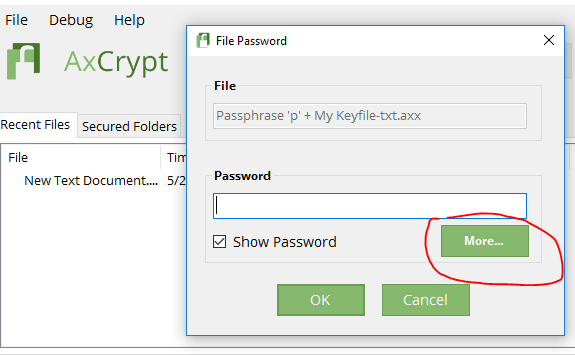
If you are using AxCrypt 2 to open AxCrypt 1-files encrypted with a different password than your sign in password, you’ll be presented with a dialog which allows you to specify a key file as well after klicking the “More…” button.
Hi Todd & RobertM,
Encrypting the “actual folder” is a much different type of operation, and has different behavior in many ways than encrypting the files. AxCrypt is likely to remain a file encryption software for the forseeable future.
Encrypting & anonymizing in one step might be supported in the future, although we really do try to keep the number of options down…
Hello Håkan,
If you do not remember the password to your account, you can always reset it. This is not a way to recover encrypted files! It’s only to allow you to sign in to the AxCrypt app and web. The new password will be used to encrypt new files. Go to https://account.axcrypt.net/Home/PasswordReset to do this, or you can also go there from AxCrypt with File | Options | Password Reset .
-
This reply was modified 8 years, 10 months ago by
-
AuthorPosts