



Forum Replies Created
-
AuthorPosts
-
Hello Doug,
You’re making it overly complicated ;-)
Don’t send each other your public keys – we take care of that.
Here’s how you do it:
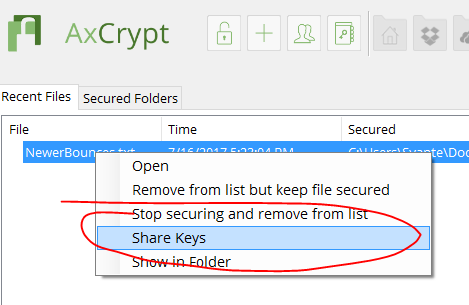
Right-click the file in the AxCrypt recent files windows. Select ‘Share Keys’.
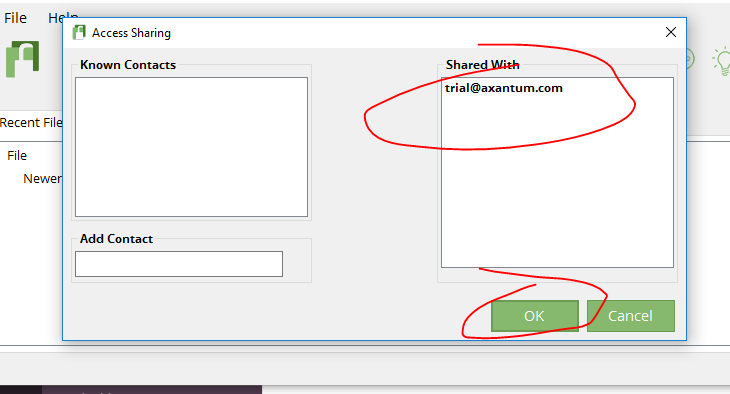
Add the other persons email address (the one (s)he uses for AxCrypt) to the list of “Shared With”. Click Ok.
Send the file.
-
This reply was modified 8 years, 8 months ago by
 AxCrypt Support. Reason: Added screen shots
-
This reply was modified 8 years, 8 months ago by AxCrypt Support.
Hello David!
I’ve responded to your support request. For general info – the issue appears to be related to PayPal problems which currently is very slow and has extremely long response times. The payment integration works by us first sending you, the buyer, to PayPal via a redirect link to your browser. You then pay to PayPal. We then do nothing until our server gets a ‘call back’ from the PayPal server, upon which time we credit the account. In this case, the ‘call back’ appears to have been delayed by PayPal for almost 12 hours!
July 14, 2017 at 23:13 in reply to: Can't open existing Axcrypt files with latest version of Axcrypt #7365Hello Alex,
Yes, a screen shot please. You can also contact our support via email at: support att axcrypt dott net .
July 14, 2017 at 11:25 in reply to: Contacts button gone dark after buying premium: Also no way to add files #7360Hello Derek,
No need to sign out / sign in in your case, since looking at the screen shot I see the “Premium” indicator in the title bar.
Thank you for reporting this! That’s actually a bug, but not quite the way it appears. Right now the button is somewhat unintuitively a synonym for selecting and right-clicking files in the recent files list and selecting “key share”. So, it will actually become enabled if you select a file or two in the recent files list. We’ll be fixing this shortly!
Your second issue “now way to add files” I don’t quite understand, is it related to the key sharing issue? If so, the intention is for files to be selected first, then the key sharing applied, so there is no ‘add files’ in the key sharing dialog. If I’ve misunderstood, please explain more!
Hello sam,
You can download the app from Play Store and the App Store as appropriate. We do not supply raw APK files etc.
July 13, 2017 at 20:04 in reply to: Unexpected Error! Exception during processing Access to path 'C:\xxx' denied #7354Hello nobody,
Please contact our support. Email to support att axcrypt dott net .
Hello Totoz,
1 – The password manager is a general purpose password manager. We do expect you to have different passwords for different online services for example. The only password it does not make sense to keep there, is your AxCrypt ID password…
2 – You use the ‘File | Options | Change Password’ option when signed in, or go to https://account.axcrypt.net/, sign in, and use the Change Password option there.
Hello Anonymous,
We don’t have a warning pop-up when the auto-sign-off is triggered, and we can’t re-encrypt everything. We do when you try to exit the program.
Hello AK-Neuss and Norman,
AxCrypt won’t clean temporaries if it decides there’s a risk of modifications getting lost if we just delete them. We can’t re-encrypt them and clean them if you’re not signed in, since we don’t know the password (in theory we could use your public key actually, but so far we’ve decided not to do so, since we have a strong statement that you can always open an AxCrypt file if you know the password. If we just used the public key, and you lost the private key, then the file would not be possible to open).
Hello Totoz,
Yepp, the post reflects the authors professional opinion, i.e. me. I’m the person who makes all the design decisions concerning AxCrypt, and has done so for the last 17 years or so. The idea is that while of course I’m not perfect, I do have a fairly good grasp of the overall situation as well as the nitty gritty details. Also, while perhaps there are no proofs, much of the reasoning is based on best practices in the security and cryptograhpy community.
AxCrypt has always been about me taking informed, professional, decisions on the behalf of my users – so you don’t have to. That’s why you can’t chose algorithms. That’s why the installation does not have a single choice.
After much reflection, I’ve come to the conclusion that the only relevant reason for having different passwords, is for sharing with other persons. We address that instead by way of the key sharing function, which scales better and is just so much safer any way you look at it (with the possible exception of the invitation scenario, where you invite a user to share secure access to a file before (s)he has a registered AxCrypt account in which case we do have access to the private key until that user sets the password).
So, what you should do to share secure access with different individuals is to use the key sharing function, which uses proven public key technology to achieve this goal without the need of sharing passwords.
Hello Pascal,
That would indicate that the file file has been damaged somehow, or there is a bug in the compression library. The latter seems very unlikely. Since the compression phase is entirely deterministic, it would mean that certain combinations of input data would always produce compressed data that would cause this problem. The library is used by us and by so many others, it’s really unlikely (though of course nothing is impossible). My guess is the file has been damaged externally somehow, after the fact.
What we’d need to do is to verify the structure and checksum of the file. We don’t actually have this function, because we’ve never really needed it! So, we’ll have to implement this first before knowing exactly what has happened. See https://bitbucket.org/axantum/axcrypt-net/issues/297/add-feature-to-verify-file .
Hi dp,
Try again! The current download is 2.1.1516 . The latest is always available from https://forum.axcrypt.net/ . You just missed the update yesterday ;-)
Hello Fred,
Please contact support via email: support att axcrypt dott net . Include a screen shot of the error message as well as of the Windows Explorer window where we can see the files in question, in ‘list’ mode preferably .
Hello,
You might want to try and decrypt with an older version. You can download from http://www.axantum.com/ .
Hello dp,
Are you sure you have the *latest* – 2.1.1516 ? We had this issue in 2.1.1513, but we have addressed it and have several confirmations that it has been fixed in 2.1.1516.
-
This reply was modified 8 years, 8 months ago by
-
AuthorPosts