


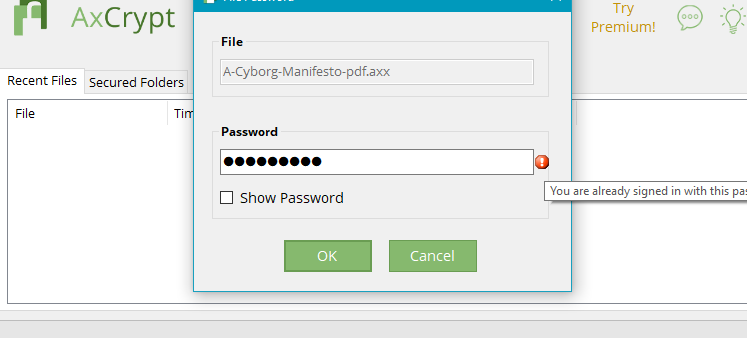
So I encrypted my folder that had files in it with Axcrypt, forgot my password, changed it and now I cannot open nor decrypt files because I keep getting this password error. I'm using the trial version. Any help is appreciated.
Hi Tony,
AxCrypt will allow the users to decrypt the encrypted file with the original password which is used for encryption.
If the file was encrypted with a different password than your sign in password, then you have to enter the file password while viewing/decrypting the encrypted file.
While viewing the encrypted file (having different password than your sign in password), you have to enter the file password. If you enter the AxCrypt account password instead of file password, then you will get the alert message like “You are already logged in with this password! ". So you need to enter the file password.
For example: Try to encrypt a file with your AxCrypt password and then reset your AxCrypt account password using Reset Password Feature. Now if you open the encrypted file, you will be prompted for enter the file password (which is used for encryption of the file).
The above situation was happened for you. So please try to remember your file password(which is used for encryption) then try to decrypt the encrypted file.
If you do not know the file password (which is used for encryption), You can't decrypt the encrypted file(s).
Please Note: Password reset is not a way to recover encrypted files! It's only to allow you to sign in to the AxCrypt app and web.
The program warns you to not forget your password. Use an external password manager next time for better luck.
as Axcrypt author say :
" There is no backdoor in Axcrypt to decrypt the files ! "
The window that asks me the password does not open up with the result that i cannot decrypt any of my encrypted files.
Please advise.
EPM
Hello Evangelos ,
AxCrypt will allow the users to decrypt the encrypted file with the original password which is used for encryption.
If the file was encrypted with a different password than your sign in password, then you have to enter the file password while viewing/decrypting the encrypted file.
While viewing the encrypted file (having different password than your sign in password), you have to enter the file password. If you enter the AxCrypt account password instead of file password, then you will get the alert message like “You are already logged in with this password! “. So you need to enter the file password.
For example: Try to encrypt a file with your AxCrypt password and then reset your AxCrypt account password using Reset Password Feature. Now if you open the encrypted file, you will be prompted for enter the file password (which is used for encryption of the file).
So please try to remember your file password(which is used for encryption) then try to decrypt the encrypted file.
If you do not know the file password (which is used for encryption), You can’t decrypt the encrypted file(s).
Still, if you are facing any issues, please provide detailed information about the issue and some screenshots and write a mail to support@axcrypt.net. We are happy to help you.
Hi read new post here, sorry Prab you talk about "password" and "file password"
can u explain what's difference between ?
I discover a very important tip here that if we change password of AXC i cannot decrypt files encrypted with different password... so if i need change my password, need to have my all files clear decrypted befrore encrypt again with new passw?
many tks
Hello Maurizio,
Please read the difference between Password reset and change in our blog, https://www.axcrypt.net/blog/password-reset-axcrypt/. Both the Password reset and change are not the same.
If you have any queries, please feel free to contact our support via support@axcrypt.net.
I have read your blog, it is very helpful for me. I want to say thank you to you. I have bookmarked your website to read more news articles from you. [redacted]


