


Hello,
if got a problem with the installation of axcrypt on my macbook.
The macbook has the version 10.15.5. I can not open the file because it says, that axcrypt need an update.
I am grateful for any information.
Best regards Gillian!
Hello Gillian,
The Mac operating system Catalina, includes some security features, Please check the link to know more about that - https://www.apple.com/in/macos/catalina/features/#security . Because of that reason, now we are not able to install and use the AxCrypt app in Catalina.
Unable to install the AxCrypt app in macOS - After updating the macOS to latest, AxCrypt have to fulfil mac operating system’s latest security policies. Actually, we are working on that. Soon, we will fix and update the same.
Still, we can install the AxCrypt app in the mac OS Catalina. Here is the workaround,
After installing, Start securing or decrypting/open your files with the AxCrypt app.
Please make sure that you have to allow the AxCrypt app to access the folders on your mac(refer the screenshot)
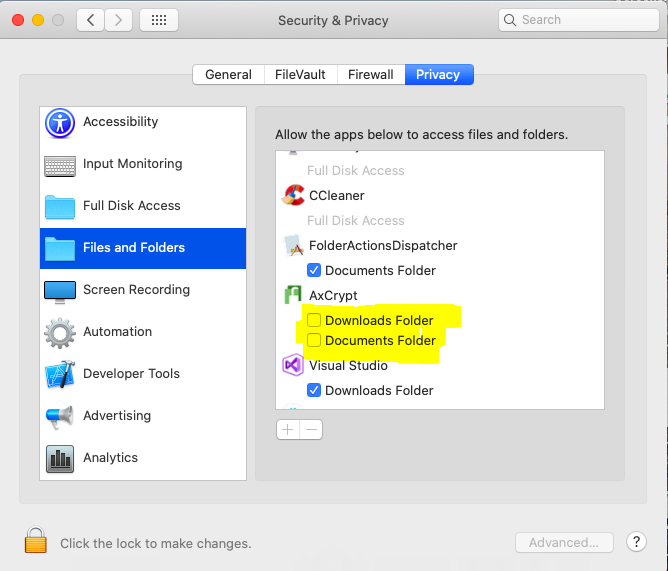
Still, you are facing any issues, please send the error report(ReportSnapshot.txt) file which is available in your system path(~/.local/share/axcrypt) with some detailed information.
Still, if you are facing any issues, please write to Support@axcrypt.net. we are happy to help you.
Hello,
I have currently installed the trial version of AxCrypt on my Mac at version 2.2.668.0, the Mac was already at Catalina Version 10.5.5 at the time of new installation, so two questions,
1) do you have an idea of when the upgrade to fully enable features for the latest MacOS version might appear?
2) On my Mac in the System Preferences / Privacy window as depicted in your screenshot above, AxCrypt does not appear in the Privacy / Files and Folders section, is this a known problem or part of the coming upgrade?
Regards, Derek
Hello Derek B,
Apologies for the delayed response.
1. Our developers are busy with developing and fixing major and high priority task/issues. Based on our developers availability, We will released the near feature as soon as.(We are not sure when we are going to do).
2. Mac Catalina has updated the features. Please check it. We think it's not a problem(not sure). Do you facing any issue with AxCrypt app, please write an email to our support team support@axcrypt.net.

