


si le mot de passe est oublié ..
merci
Hello rahal brahim,
AxCrypt will allow the users to decrypt the encrypted file with the original password which is used for encryption.
Unfortunately, if you do not know the password for an AxCrypt-encrypted file you cannot open it, even if you can sign in to the account. This is by design, it's just this situation that AxCrypt is made for and it works like this even if you actually are the original owner of the file.
Please know about the password reset and change, actually both are different. You can check the difference between the Password reset and change here: http://forum.axcrypt.net/blog/password-reset-axcrypt/ .
AxCrypt is a file encryption software with no backdoor. So please careful with your AxCrypt account password.
Dear All,
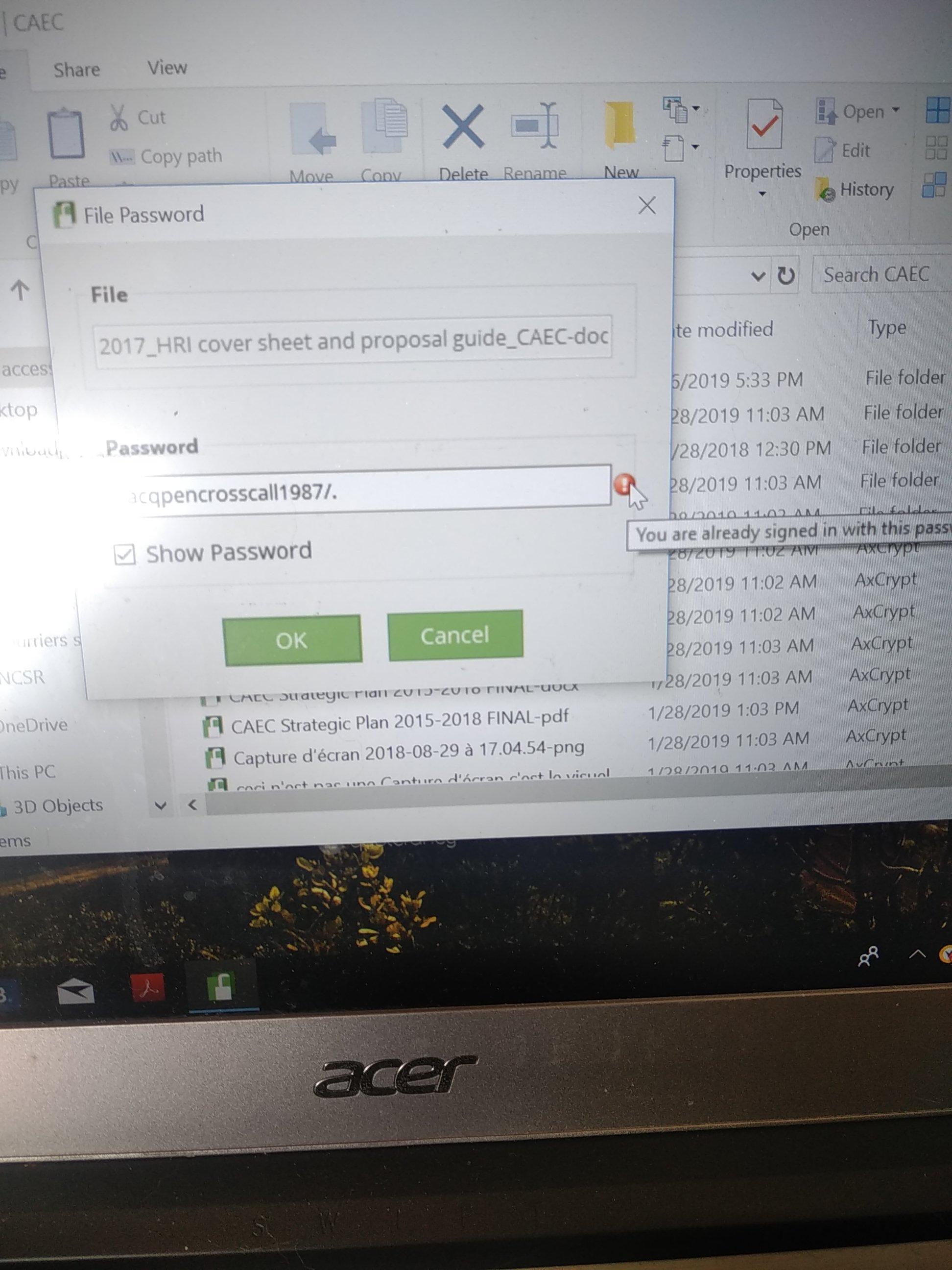
I change my password because I forget it. Since I change it I have this message ( See Attachef file). I can't oppen it.
Could you help me
Hello Ramenah,
AxCrypt will allow the users to decrypt the encrypted file with the original password which is used for encryption.
If the file was encrypted with a different password than your sign in password, then you have to enter the file password while viewing/decrypting the encrypted file.
While viewing the encrypted file (having different password than your sign in password), you have to enter the file password. If you enter the AxCrypt account password instead of file password, then you will get the alert message like “You are already logged in with this password! “. So you need to enter the file password.
For example:
Try to encrypt a file with your AxCrypt password and then reset your AxCrypt account password using Reset Password Feature. Now if you open the encrypted file, you will be prompted for enter the file password (which is used for encryption of the file).
The above situation was happened for you. So kindly try to remember your file password(which is used for encryption) then try to decrypt the encrypted file.
Please know about the password reset and change, actually both are different. You can check the difference between the Password reset and password change here: http://forum.axcrypt.net/blog/password-reset-axcrypt/ .
AxCrypt is a file encryption software with no backdoor. So please careful with your AxCrypt account password.

